
Introduction
In today’s fast-paced software development landscape, clear communication and precise documentation are as critical as clean code. For Software Engineering teams embracing Agile methodologies, visual modeling with UML (Unified Modeling Language) provides a powerful bridge between abstract requirements and concrete implementation. However, adopting professional-grade modeling tools often comes with significant licensing costs—a barrier for startups, students, and teams experimenting with new practices.
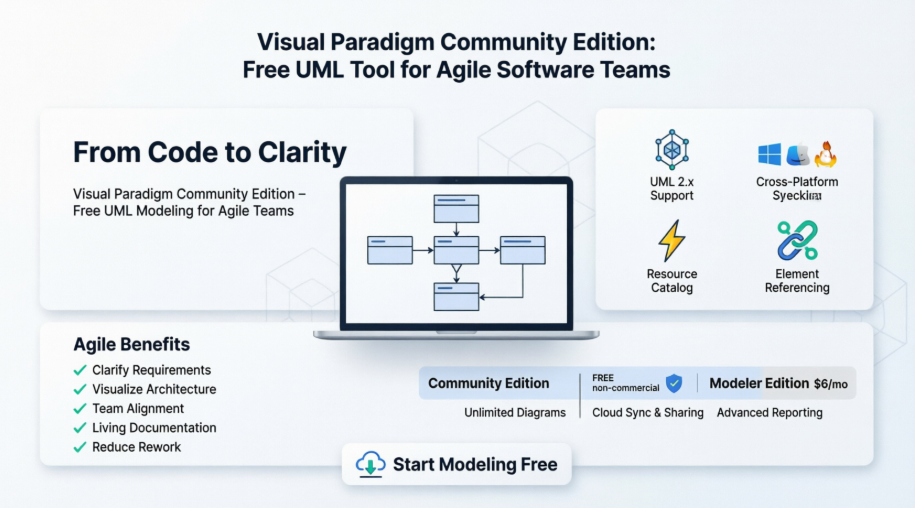
Enter Visual Paradigm Community Edition: a robust, free UML tool designed to empower teams with enterprise-level modeling capabilities without the enterprise price tag. This comprehensive guide explores how Software Engineering teams can leverage Visual Paradigm Community Edition to enhance their Agile workflows, improve system design clarity, and foster better collaboration—all while maintaining the flexibility and speed that Agile demands.
What is Visual Paradigm Community Edition?
Visual Paradigm Community Edition is a free, fully-featured UML modeling tool that supports UML 2.x diagrams and beyond. Built for developers, architects, and analysts, it provides a streamlined interface focused on productivity without redundant widgets, enabling you to design freely in a large, intuitive diagram editor.
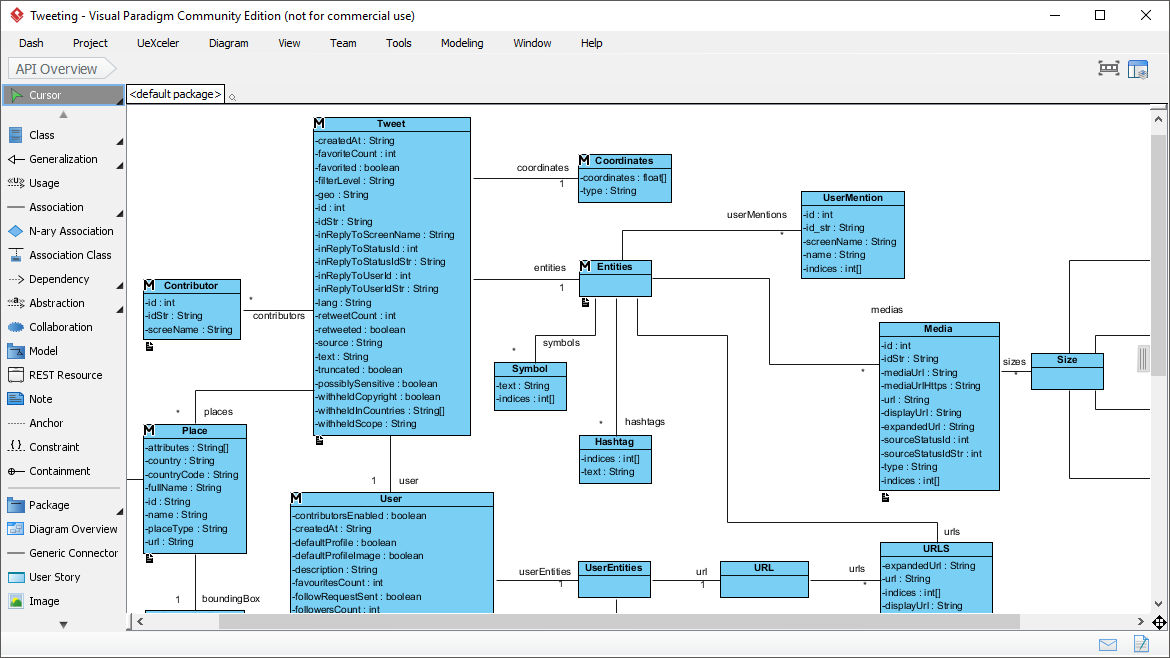
Design API with the Class Diagram tool. With no redundant widgets on the screen, you can design freely in a large diagram editor.


Everything You Need, in One Place
 UML Support
Draw ANY of the UML 2 diagrams
From Use Case and Class diagrams to Sequence, State Machine, and Deployment diagrams—Visual Paradigm supports the complete UML 2.x specification, ensuring your modeling stays standards-compliant and future-proof.
 Modeling Capability
Re-usable elements, syntax checking, sub-diagrams, etc.
Go beyond simple drawing: reuse model elements across diagrams, validate designs with real-time syntax checking, and manage complexity with hierarchical sub-diagrams.
 Efficiency
We care about the difference between a click and a drag.
Thoughtful UX design minimizes friction. Smart connectors, context-sensitive palettes, and keyboard shortcuts keep your modeling flow uninterrupted.
 Cross Platforms
Modeling in ANY Java-enabled platform – Windows, Mac OS X, Linux
Your team’s diverse workstation preferences are no barrier. Deploy consistently across all major operating systems.
Resource Catalog: Draw UML Diagrams in Quick

With just a few clicks of your mouse, you can create stunning diagrams in no time. The Resource Catalog is your secret weapon for maximum efficiency and top-notch quality. Visual Paradigm, the UML software of your dreams, is designed with you in mind, ensuring that every aspect of your design journey is as seamless and high-quality as possible.
💡 Pro Tip: Use the Resource Catalog’s drag-and-drop shapes to rapidly prototype system structures during sprint planning sessions.
Real Modeling Tools: We Build Modeling Software, Not Drawing Tools

Reuse elements in different models, ensure the correctness of design with syntax checking, establish multiple levels of abstraction with sub-diagrams, add references to design artifacts, etc. Visual Paradigm is a UML tool designed for a great outcome. If you have ever used a real modeling software, you will appreciate how much it can help with your modeling work.
Element Referencing: Linkage Established

Visual Paradigm is a full-featured UML software that allows you to establish linkages among UML model elements and with external resources like webpages and physical files. This traceability is invaluable for maintaining living documentation that evolves with your codebase.
Feature Comparison: Community Edition vs. Modeler Edition
* A single-lined watermark will appear in printout and images produced by the Community Edition
For Software Engineering Teams: Adopting UML Modeling with Agile
Why Combine UML and Agile?
Agile methodologies prioritize working software over comprehensive documentation—but that doesn’t mean documentation is obsolete. Strategic visual modeling with UML complements Agile by:
✅ Clarifying complex requirements before sprint commitment
✅ Visualizing system architecture for better technical decision-making
✅ Facilitating cross-functional alignment between developers, testers, and product owners
✅ Creating living documentation that evolves with iterative development
✅ Reducing rework by catching design flaws early in the cycle
Recommendations for Implementation
-
Start Small, Scale Smart
Begin with high-impact diagrams like Use Case or Sequence diagrams during sprint planning. Gradually introduce Class or Component diagrams for complex modules. -
Integrate Modeling into Ceremonies
-
Sprint Planning: Sketch high-level Sequence diagrams to clarify user story flows.
-
Refinement Sessions: Use Class diagrams to discuss domain model evolution.
-
Retrospectives: Review diagram updates as part of “definition of done.”
-
-
Leverage Reusability & Traceability
Use Visual Paradigm’s element referencing to link UML elements to Jira tickets, Confluence pages, or source code repositories. This creates a traceable thread from requirement to implementation. -
Establish Team Conventions
Define naming standards, diagram scopes, and update protocols to ensure consistency across the team’s modeling artifacts. -
Use Community Edition Strategically
For non-commercial projects, prototypes, or learning initiatives, the free Community Edition provides full UML 2.x support. Upgrade to Modeler Edition only when you need advanced collaboration or business process modeling features.
Experience Sharing: Real-World Wins
“We used Visual Paradigm Community Edition to model our microservices architecture during a 2-week spike. The Class and Deployment diagrams helped us identify coupling issues before writing a single line of code—saving an estimated 30+ hours of refactoring.”
— Senior Engineer, FinTech Startup
“As a distributed team, we embedded Sequence diagrams in our Confluence docs using exported PNGs from Visual Paradigm. The visual clarity reduced miscommunication in async discussions by ~40%.”
— Agile Coach, SaaS Scale-up
“Teaching UML to new hires? The free Community Edition lets them practice modeling without licensing friction. Syntax checking provides instant feedback, accelerating onboarding.”
— Engineering Manager, Enterprise Tech
Who’s Using Visual Paradigm?

Visual Paradigm is trusted by over 230,000 people in companies ranging from small business to Fortune 500 companies, universities, and government units. Its flexibility makes it equally valuable for:
-
🎓 Academic institutions teaching software engineering
-
🚀 Startups validating product architecture
-
🏢 Enterprises modernizing legacy systems
-
🌍 Open-source communities documenting complex projects
Conclusion: Model Smarter, Ship Faster
Visual Paradigm Community Edition democratizes professional-grade UML modeling, removing cost barriers while delivering the precision Software Engineering teams need. When thoughtfully integrated into Agile workflows, UML diagrams become dynamic artifacts that enhance—not hinder—velocity and quality.
By starting with the free Community Edition, teams can experiment, learn, and demonstrate value before considering paid upgrades. The key is intentionality: use modeling where it adds clarity, keep diagrams lean and focused, and treat them as living documents that evolve with your product.
In an era where software complexity continues to grow, the ability to visualize, communicate, and validate design decisions isn’t a luxury—it’s a competitive advantage. With Visual Paradigm Community Edition, that advantage is freely within reach.
Ready to start modeling?
🔗 Download Visual Paradigm Community Edition (FREE)
🔗 Explore All Editions & Start a Free Trial
References
- Visual Paradigm Community Edition – Free UML Tool: Official product page detailing features, diagrams supported, and edition comparisons for the free Community Edition of Visual Paradigm.
- UML Tool Features – Use Case Diagram: Documentation on creating and managing Use Case diagrams for requirements modeling.
- UML Tool Features – Class Diagram: Guide to designing system structure and APIs using Class diagrams.
- UML Tool Features – Sequence Diagram: Resources for modeling dynamic interactions and message flows between objects.
- Database Design with ERD Tools: Tutorial on Entity Relationship Diagrams for database schema design.
- SysML Diagram Tool – Requirement Diagram: Support for systems engineering with SysML requirement modeling.
- Business Modeling Diagrams – Business Concept Diagram: Tools for visualizing business domains and conceptual models.
- BPMN Diagram and Tools: Business Process Model and Notation support for workflow modeling (Modeler Edition).
- Team Collaboration Toolset: Features for cloud/on-premises collaboration, diagram reviews, and commenting (Modeler Edition).
- Task Management Integration: Linking modeling artifacts to project tasks and agile boards (Modeler Edition).
- Glossary Management Tools: Centralized terminology management for consistent modeling vocabulary (Modeler Edition).
- Textual Analysis Tool: AI-assisted extraction of model elements from natural language requirements (Modeler Edition).
- Download Visual Paradigm Community Edition: Direct download link for the free, non-commercial version.
- Visual Paradigm Download Center: Access trials and installers for all Visual Paradigm editions.