
In the world of software architecture and system design, understanding the flow of control and data between components is critical. While static diagrams show structure, Sequence Diagrams bring that structure to life by illustrating interactions over time. One of the most nuanced yet essential aspects of creating a high-fidelity sequence diagram is accurately representing the timing of these interactions.
This tutorial explores the distinction between instantaneous messages and those that involve significant processing or network latency. We will walk through the visual syntax used to denote these delays and demonstrate how to implement this logic using Visual Paradigm.
Understanding the Concept of Time in UML
In a real-world distributed system, not all operations happen instantly. When a client sends a request to a server, the time it takes for that request to traverse the network, be processed, and return a response can vary significantly. Modeling this behavior is vital for performance analysis and architectural clarity.
UML (Unified Modeling Language) provides specific notations to handle this:
- Instantaneous Calls: These represent synchronous interactions where the response is assumed to happen immediately, or the delay is negligible for the context of the diagram.
- Non-Instantaneous Calls: These represent asynchronous interactions or scenarios where the message is sent, and there is a distinct period of processing or network latency before the response is received. This creates a visual gap in the timeline.
Visualizing the Difference
To clearly communicate these temporal differences to stakeholders, we use specific arrow styles. Let’s break down the two primary methods shown in our reference diagram.
1. Instantaneous Messages
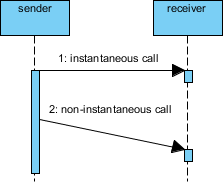
An instantaneous message is typically depicted as a straight, solid arrow with a filled arrowhead. It implies that the sender initiates the call and the receiver responds effectively at the same moment on the timeline. There is no visual break in the flow of execution.
2. Non-Instantaneous Messages
When a delay occurs, we use a slanted arrow. This is the key visual indicator of time passing. The slant represents the duration of the transit or processing time.
Key Technical Insight: In the context of the diagram below, observe the arrow labeled “2: non-instantaneous call.” The line starts from the sender’s timeline and angles downward to reach the receiver’s timeline. This slant is not just an aesthetic choice; it semantically communicates that the message is in transit or being processed for a duration.
Visual Example
Consider a scenario involving a sender and a receiver. The interaction proceeds as follows:
- Step 1: The sender initiates an instantaneous call. The arrow is horizontal, indicating immediate processing.
- Step 2: The sender initiates a non-instantaneous call. The arrow is slanted, indicating that the message takes time to traverse the network or undergo processing before the receiver can act.
Implementing in Visual Paradigm
To apply these concepts in your own projects, Visual Paradigm offers a robust environment for creating and editing these diagrams. Visual Paradigm (VP) allows for precise control over the “timing” visual syntax.
Follow these steps to create a sequence diagram with non-instantaneous messages:
Step 1: Set Up the Participants
Start by dragging and dropping two lifelines onto your canvas. Label them sender and receiver. Ensure they are aligned vertically to represent the flow of time downwards.
Step 2: Add the Instantaneous Message
Select the Message tool from the palette. Click on the sender lifeline and drag horizontally to the receiver lifeline. Label this message “1: instantaneous call”. By default, this creates a straight arrow.
Step 3: Add the Non-Instantaneous Message
To create the slanted arrow:
- Select the Message tool again.
- Click on the
senderlifeline at a point lower than the first interaction. - Drag the cursor towards the
receiverlifeline. In Visual Paradigm, you may need to manually adjust the angle or select the “Slant” option in the message properties to ensure the arrow is not horizontal. - Label this message “2: non-instantaneous call”.
Step 4: Refine the Activation Bars
Ensure that the activation bars (the rectangular boxes on the lifelines) reflect the timing. For the non-instantaneous call, the activation bar on the sender should continue until the slanted arrow is sent, and the receiver’s activation bar should appear only after the arrow “lands” at the bottom of the slant.
Tooling: Visual Paradigm
For this tutorial, we utilize Visual Paradigm, a comprehensive modeling tool that supports UML 2.0 and provides extensive features for sequence diagramming. It allows users to define message types (Synchronous, Asynchronous, Return, etc.) and customize the visual representation of time delays.
Visual Paradigm enables teams to create professional-grade system architecture documentation without requiring complex coding skills. By mastering the visual syntax of timing, you ensure your diagrams accurately reflect the reality of your system’s performance.
@startuml
actor User
participant "System" as Sys
participant "Database" as DB

User -> Sys : 1: Login Request (Instantaneous)
activate Sys
Sys -> DB : 2: Query User Data (Non-Instantaneous)
activate DB
DB --> Sys : 3: Data Retrieved
deactivate DB
Sys --> User : 4: Welcome Message
deactivate Sys
@enduml
Conclusion
By distinguishing between instantaneous and non-instantaneous messages, you add a layer of depth to your system architecture documentation. The slanted arrow is a simple yet powerful tool that communicates the complexity of time and latency in software systems. Whether you are designing a microservices architecture or a simple client-server application, mastering these UML nuances will make your diagrams more accurate and your communication with stakeholders more effective.