
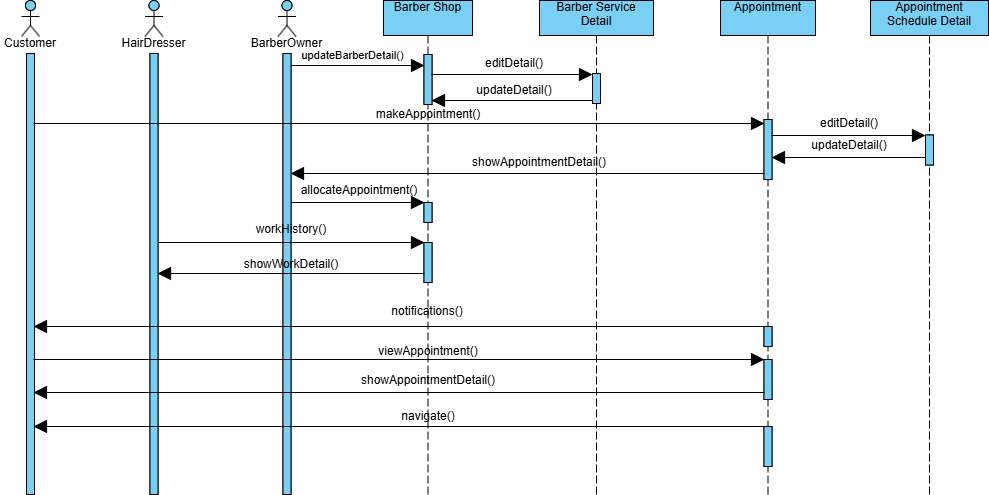
In the world of software engineering, understanding how objects interact over time is crucial for building robust systems. A Sequence Diagram is one of the most effective tools to visualize this temporal logic. In this tutorial, we will dissect the architecture of a Barber Shop management system, focusing on how Customer, HairDresser, and BarberOwner roles interact with backend services like Barber Service Detail and Appointment Schedule Detail.
Understanding the Anatomy of the Diagram
Before diving into the logic, let’s establish the vocabulary of this Sequence Diagram using Visual Paradigm concepts.
- Actors (Lifelines): Represented by stick figures at the top (Customer, HairDresser, BarberOwner). These are the human users initiating the workflow.
- System Components: Represented by rectangles (Barber Shop, Barber Service Detail, Appointment, Appointment Schedule Detail). These are the software objects processing the data.
- Activation Bars: The blue vertical rectangles on the dashed lines. These indicate when an object is actively performing an operation or is “in control.”
- Messages: The horizontal arrows representing method calls or data transfers between objects.
Step-by-Step Logic: The Appointment Workflow
The diagram illustrates a complex workflow involving data updates, appointment creation, and history tracking. Let’s break down the sequence of events.
1. Updating Barber Details
The process begins with the BarberOwner interacting with the system. They need to ensure the information for a specific barber is accurate.
BarberOwner --updateBarberDetail()--> [Barber Shop]
[Barber Shop] --updateDetail()--> [Barber Service Detail]
The BarberOwner sends an updateBarberDetail() request to the main Barber Shop controller. The controller then delegates this task to the Barber Service Detail object to persist the changes.
2. Creating and Viewing Appointments
Once the barber details are updated, the system focuses on scheduling. The BarberOwner initiates the creation of a new appointment.
BarberOwner --makeAppointment()--> [Appointment]
[Appointment] --editDetail()--> [Appointment Schedule Detail]
[Appointment Schedule Detail] --updateDetail()--> [Appointment Schedule Detail]
[Appointment Schedule Detail] --showAppointmentDetail()--> [Appointment]
This sequence highlights a nested interaction. The Appointment object calls the Appointment Schedule Detail to edit and update the schedule. Once the data is stable, the schedule detail returns the data to the appointment object via showAppointmentDetail(), effectively rendering the appointment view.
3. Allocating Resources and Tracking History
With the appointment details set, the system must allocate the specific resource (the barber) and log the activity.
Appointment --allocateAppointment()--> [Barber Service Detail]
[Barber Service Detail] --workHistory()--> [BarberOwner]
[Barber Owner] --showWorkDetail()--> [BarberOwner]
The Appointment object triggers allocateAppointment() against the Barber Service Detail. This triggers a workHistory() retrieval, which sends data back to the BarberOwner, who then calls showWorkDetail() to display the history.
4. Notifications and User Navigation
The final phase involves communication with the end-users and navigation logic.
[Barber Service Detail] --notifications()--> [Customer]
[Appointment] --viewAppointment()--> [Customer]
[Appointment] --showAppointmentDetail()--> [Customer]
[Appointment] --navigate()--> [Customer]
After the backend processing is complete, the system pushes notifications() to the Customer. Finally, the Customer is granted access to view the appointment, see the details, and navigate the interface.
Conclusion
By breaking down this diagram, we can see that the Barber Shop system is well-structured. It separates concerns between the Owner, the Service, and the Customer. Using Visual Paradigm to model these interactions ensures that developers and stakeholders have a clear, shared understanding of the application’s logic before a single line of code is written.