
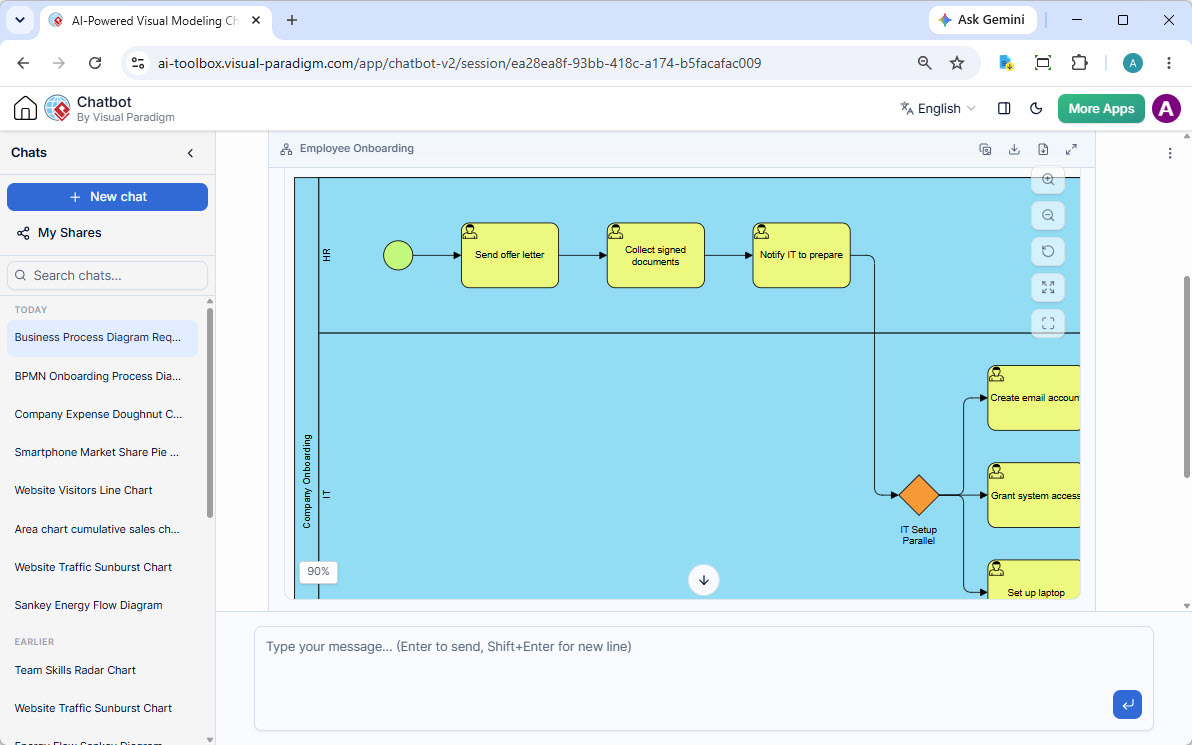
In the modern enterprise, business processes rarely belong to a single department. They are complex ecosystems that require seamless collaboration between Human Resources (HR), IT, Finance, and other functional units. This tutorial explores the architecture of a standard Employee Onboarding Process, illustrating how to model these interactions effectively using Business Process Model and Notation (BPMN) swimlanes.
Understanding the Architecture: Swimlanes and Orchestration
The visual diagram presented in our example is a classic representation of an orchestration model. It utilizes the Swimlane pattern, a critical concept in process modeling. Swimlanes provide a visual partitioning of a process diagram, allowing the viewer to see which role, department, or system is responsible for each specific task.
When modeling a system architecture like onboarding, we typically see two primary lanes:
- HR Lane: Responsible for the administrative and legal aspects of hiring, such as generating offers and collecting compliance documents.
- IT Lane: Responsible for the technical provisioning required for the new employee to start work, such as setting up hardware and digital credentials.
The power of this architecture lies in the flow of information. The process is not linear; it is a hand-off mechanism. The completion of a task in one lane triggers a dependency in another. In our example, the “Notify IT” task acts as the bridge between the administrative world of HR and the technical world of IT.
The Sequential Path: HR Responsibilities
The process initiates with the HR lane, following a strictly sequential flow. This represents the “human” side of the onboarding journey:
- Start Event: The process begins, typically triggered by a requisition approval or a signed employment contract.
- Send Offer Letter: HR prepares and dispatches the formal offer to the candidate.
- Collect Documents: Once the offer is accepted, HR must gather necessary compliance and identification documents.
- Notify IT: This is the critical transition point. Upon confirmation of document collection, HR triggers a signal to the IT department that a new resource is ready for provisioning.
The Concurrent Path: IT Responsibilities
Once the signal is received from HR, the process enters the IT Lane. Here, the architecture shifts to handle parallel execution to optimize efficiency. Instead of setting up the laptop, then the email, then the access (which would take days), the system utilizes a Parallel Gateway.
This gateway splits the single incoming flow into multiple independent paths that execute simultaneously:
- Create Email Account: Generating the digital identity.
- Grant System Access: Configuring permissions and security groups.
- Set up Laptop: Preparing the physical hardware.
By executing these tasks in parallel, the “Time-to-Productivity” for the new hire is significantly reduced compared to a serial execution model.
Technical Modeling Concepts
Understanding the visual elements of this diagram requires a grasp of the underlying BPMN 2.0 specification rules. Let’s break down the technical symbols used in this architecture.
1. The Sequence Flow
The solid arrows connecting the tasks represent the Sequence Flow. In BPMN, this defines the order of activities. In the HR lane, the sequence is strict: Task A must finish before Task B starts. This is the default behavior of the model.
2. The Parallel Gateway (Divergence)
The orange diamond shape in the IT lane is a Parallel Gateway. Unlike a Decision Gateway (which splits the flow based on a condition, allowing only one path to be taken), a Parallel Gateway splits the flow into all outgoing paths simultaneously. It is the architectural equivalent of a “fork” in concurrency.
3. Task Annotations
Notice the icons inside the task rectangles (the small person icons). These indicate that the task is performed by a Human Actor. In a more complex system architecture, you might see a computer icon, indicating that the task is automated or performed by a software system.
Conclusion
By modeling the Employee Onboarding process using Visual Paradigm, we create a clear, actionable blueprint for IT and HR departments. This diagram does more than just show “what happens”; it defines the system architecture of the onboarding workflow, ensuring that dependencies are managed and parallel tasks are identified to maximize efficiency.