
In the rapidly evolving landscape of software architecture, documentation often lags behind development. This “documentation drift” creates confusion among teams and stakeholders. Visual Paradigm addresses this challenge through a powerful hybrid approach, combining the precision of text-based modeling with the speed of AI assistance. By leveraging the VPasCode engine and the AI C4 Studio, architects can build scalable, maintainable, and accurate system models.
This tutorial explores the core workflow of modern architecture design: from natural language input to hierarchical navigation.
1. The Power of VPasCode: Bridging Text and Visuals
Visual Paradigm’s unique selling point lies in its VPasCode engine. This feature acts as a bridge between traditional drag-and-drop GUI tools and the flexibility of text-based modeling languages like PlantUML. It allows architects to write code that is instantly rendered into professional diagrams, and conversely, edit diagrams in the GUI to generate code.
Bidirectional Synchronization
The most critical advantage of VPasCode is the elimination of “drift.” In many tools, moving a box on a canvas changes the visual but not the underlying model logic. With VPasCode:
- Code-First: You write or modify the PlantUML-style code, and the diagram updates instantly.
- Visual-First: You move a container in the GUI, and the underlying code updates to reflect that change.
Version Control Friendliness
Because the model is essentially code, it is perfectly suited for version control systems like Git. This enables:
- Code Reviews for Architecture: You can review architectural changes just like application code.
- Detailed History: Track exactly who changed what element and when.
- Conflict Resolution: Merge architectural changes more easily than binary image files.
2. AI-Assisted Architecture Generation
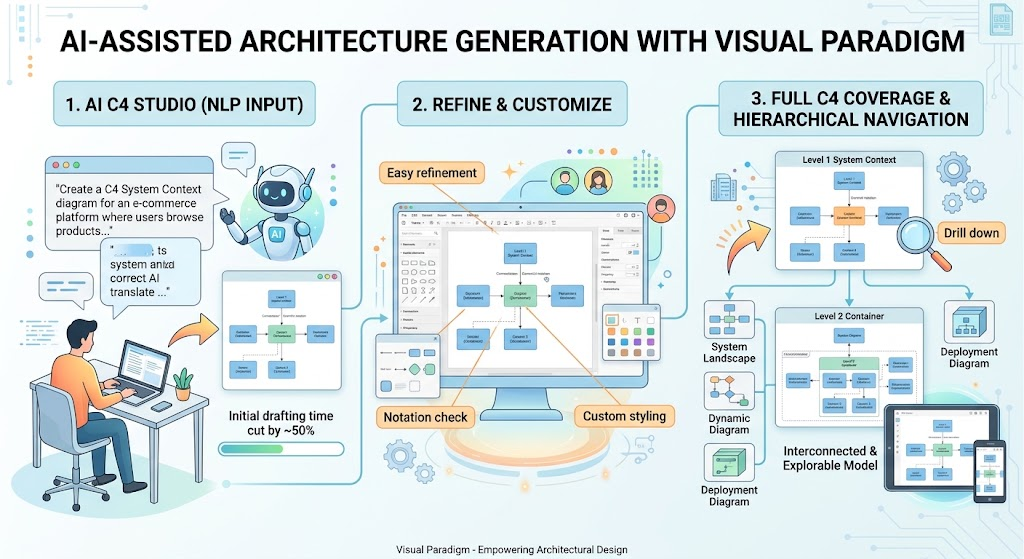
Starting from a blank canvas can be daunting. The AI C4 Studio transforms this process by allowing architects to describe their system in natural language. This feature significantly reduces the initial drafting time—often by approximately 50%.
How It Works
Instead of manually dragging boxes and drawing lines, you simply describe the system context. The AI parses this description, identifies the correct C4 notation (e.g., distinguishing between a User, a Software System, and a Container), and generates a draft diagram.
Example Prompt:
"Create a C4 System Context diagram for an e-commerce platform where users browse products via a web app, place orders through an API, and receive notifications via an external SMS gateway."The Result: The AI generates a draft diagram with correct C4 notation. You can then refine this draft, adding specific styling or logic as needed.
3. Full C4 Coverage & Hierarchical Navigation
A robust architecture tool must support the entire C4 hierarchy. Visual Paradigm provides comprehensive coverage for all four core C4 levels, as well as supplemental views like System Landscape and Dynamic diagrams.
Exploring the Levels
- Level 1: System Context - Shows the software system and how people and other systems interact with it.
- Level 2: Container - Breaks down the system into high-level containers (e.g., Web App, API, Database).
- Level 3: Component - Details the components within those containers.
- Level 4: Code - (Optional) Low-level code structure.
Hierarchical Navigation
One of the standout features is the ability to create an "explorable" model. You can "drill down" from a Level 1 System Context diagram directly into the corresponding Level 2 Container diagram. This creates a connected web of knowledge rather than isolated static images, allowing stakeholders to navigate the complexity of the architecture seamlessly.
Conclusion
By integrating VPasCode and AI tools, Visual Paradigm empowers teams to move faster without sacrificing accuracy. Whether you prefer typing code or dragging icons, this hybrid environment ensures your architecture documentation remains synchronized with reality.