
In the world of software architecture, communication is just as critical as code. The C4 model has emerged as the industry standard for visualizing software architecture, providing a clear hierarchy of diagrams that help stakeholders understand how a system fits into the broader ecosystem. The top level of this hierarchy is the System Context Diagram, which serves as the “zoomed-out” view of your application.
This tutorial guides you through constructing a System Context diagram using Mermaid.js within the VPasCode environment. We will analyze a practical example: an Online Banking System, breaking down the syntax, the semantic meaning of the components, and the relationships that bind them.
Understanding the C4 Level 1 Context
A System Context diagram is designed to answer the question: What is the system, who uses it, and what other systems does it talk to? It is the first diagram a new developer reads to understand the scope of a project. In the C4 model, this is strictly a Level 1 diagram.
Key elements in our diagram include:
- Person: The human actor interacting with the system (the Banking Customer).
- System: The software application itself (Internet Banking System).
- SystemExt: External systems that interact with the main system but are not built by your team (Mainframe, Email System).
Building the Diagram with Mermaid Syntax
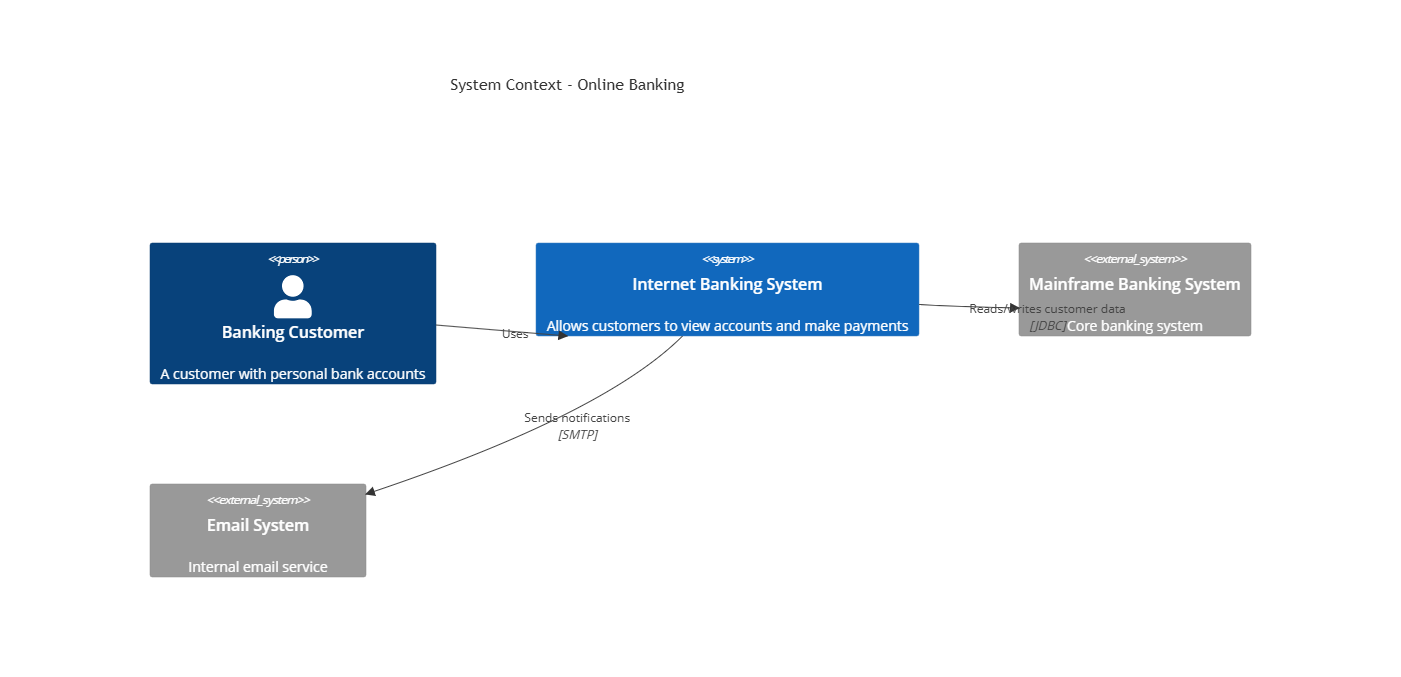
To create this diagram in VPasCode, we use the C4Context block. This is a specialized dialect of Mermaid that understands C4 semantics. Below is the exact syntax used to generate the diagram shown in the context.
C4Context
    title System Context - Online Banking

    Person(customer, "Banking Customer", "A customer with personal bank accounts")
    System(bankingSystem, "Internet Banking System", "Allows customers to view accounts and make payments")
    System_Ext(mainframe, "Mainframe Banking System", "Core banking system")
    System_Ext(emailSystem, "Email System", "Internal email service")

    Rel(customer, bankingSystem, "Uses")
    Rel(bankingSystem, mainframe, "Reads/writes customer data", "JDBC")
    Rel(bankingSystem, emailSystem, "Sends notifications", "SMTP")
Breaking Down the Code
Let’s dissect the Mermaid code line by line to understand how the visual elements are constructed.
1. The Container
Every C4 diagram starts with a specific command. Here, we use:
C4Context2. Defining Actors and Systems
The syntax follows a pattern of Type(ID, Label, Description). The ID is a unique reference used for drawing connections later.
Person(customer, "Banking Customer", "..."): Defines a human actor.System(bankingSystem, "Internet Banking System", "..."): Defines the software system.SystemExt(mainframe, ...): Defines an external system. TheExtsuffix is crucial as it tells the renderer to style this box differently (often grey) to indicate it is out of our direct control.
3. Defining Relationships (The “Rel” command)
The Rel command creates the arrows between our boxes. The syntax is Rel(Source, Target, Label, Tech).
Rel(customer, bankingSystem, "Uses"): Connects the customer to the system.Rel(bankingSystem, mainframe, "Reads/writes customer data", "JDBC"): Connects the system to the mainframe. The final argument"JDBC"is optional but highly recommended; it adds a technology tag to the relationship line, informing the reader how the connection is made.
Visualizing the Architecture
When rendered, the Mermaid parser interprets this text into a visual graph. Notice how the “Internet Banking System” acts as the central hub. It is the only component directly touched by the Person. All interactions with the legacy Mainframe or the Email System are mediated through this central application.
This abstraction is vital. The customer does not care about the Mainframe; they care about the “Internet Banking System.” The diagram successfully hides the complexity of the backend while explicitly showing the dependencies required to make the system work.
Why Use VPasCode for C4 Diagrams?
While Mermaid is a powerful text-to-diagram tool, integrating it into a platform like VPasCode (Visual Paradigm in the Cloud) adds significant value. The environment allows for:
- AI-Assisted Generation: You can describe your architecture in plain English, and the AI Chatbot can generate the initial Mermaid syntax, which you can then refine as shown above.
- Version Control: Diagrams are stored as code, meaning they can be versioned alongside your application source code.
- Real-time Rendering: As you edit the Mermaid syntax, the diagram updates instantly, allowing for rapid prototyping of architectural ideas.
Conclusion
Creating a System Context diagram is the first step in any serious architectural modeling effort. By mastering the C4 syntax within Mermaid, you gain the ability to document complex system interactions clearly and concisely. Whether you are using the raw syntax or leveraging AI tools in VPasCode, the result is a single source of truth that aligns your team’s understanding of the system’s boundaries.