
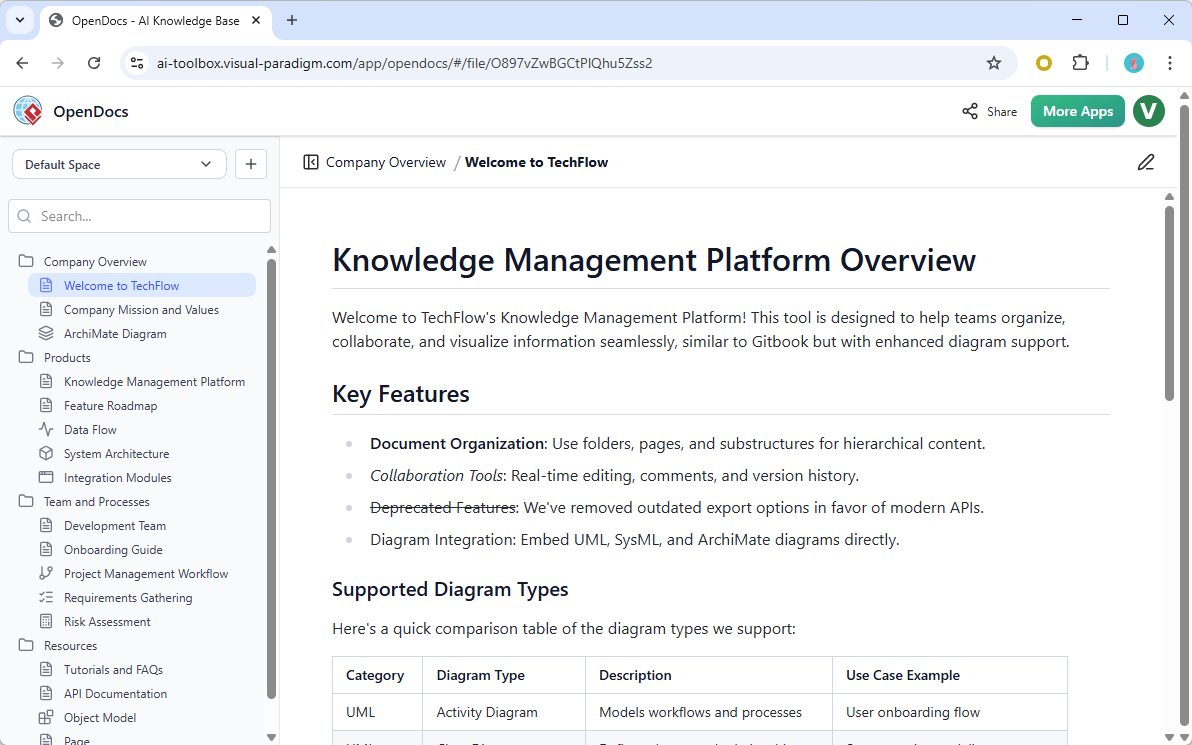
In modern software engineering and business analysis, the gap between static documentation and dynamic system modeling is often too wide to bridge. Visual Paradigm OpenDocs addresses this by unifying these two worlds, allowing organizations to build a comprehensive “Better Knowledge Base.” This tutorial explores the architectural concepts behind such a platform, focusing on the Knowledge Management Platform Overview shown in the interface, and how it integrates with complex modeling standards like UML, SysML, and ArchiMate.
The Architecture of a Knowledge Base
The core of OpenDocs lies in its hierarchical document structure. As demonstrated in the sidebar of the interface, the system organizes information using a nested file structure. This is not merely a file explorer; it is a semantic container for your architectural data.
- Company Overview: This acts as the root namespace, housing high-level strategic documents like “Company Mission” and “Welcome to TechFlow.”
- Products: A logical grouping for project-specific data. Inside, we see a “Knowledge Management Platform” entry, which serves as a sub-document containing specific technical details.
- Team and Processes: This branch links organizational structure to operational workflows, bridging the gap between human resources and system execution.
Document Organization and Substructures
Effective knowledge management relies on Document Organization. The system utilizes folders and substructures to maintain hierarchy. When you navigate to the “Knowledge Management Platform Overview” page, you are accessing a specific instance of this structure. This allows for granular control over permissions and versioning, ensuring that sensitive architectural data remains secure while remaining accessible to the right stakeholders.
Integrating Diagramming Standards
The platform’s true power is revealed in its “Supported Diagram Types.” It does not just display text; it renders complex visual logic directly within the knowledge base. The interface highlights support for three major modeling languages:
- UML (Unified Modeling Language): The industry standard for software architecture. The platform supports Activity Diagrams to model user onboarding flows and system processes.
- SysML (Systems Modeling Language): Essential for systems engineering, allowing for the modeling of requirements, behavior, and structure across hardware and software boundaries.
- ArchiMate: A language for enterprise architecture, used to describe, analyze, and visualize business, application, and technology architectures.
By embedding these diagrams directly into the documentation (Diagram Integration), the platform eliminates the “silo” effect where diagrams are stored in separate tools like Visio or Enterprise Architect, disconnected from the descriptive text.
Step-by-Step: Building a Unified Workflow
To effectively utilize this system architecture, a user typically follows a workflow that combines textual description with visual logic. Below is a representation of how a developer might define a “User Onboarding” process using the platform’s integrated tools.
@startuml
title User Onboarding Flow (UML Activity)

start
:User Accesses Portal;
if (Login Successful?) then (yes)
    :Load User Profile;
    :Display Dashboard;
    if (First Login?) then (yes)
        :Show Onboarding Wizard;
        :Complete Tutorials;
    else (no)
        :Show Recent Activity;
    endif
else (no)
    :Show Error Message;
    :Prompt Password Reset;
endif

if (Wizard Complete?) then (yes)
    :Access Granted;
    stop
else (no)
    :Keep Wizard Open;
    stop
endif
@enduml
In OpenDocs, this code snippet would be rendered directly into the “Feature Roadmap” or “Onboarding Guide” section of the sidebar, creating a live, interactive diagram that updates automatically if the underlying logic changes.
Collaboration and Versioning
The “Key Features” section of the interface emphasizes Collaboration Tools. In a distributed team, version history is critical. OpenDocs provides real-time editing capabilities, allowing multiple engineers to contribute to a single architectural document simultaneously. This ensures that the “System Architecture” document reflects the current state of the codebase, preventing the common pitfall of “outdated documentation.”
Conclusion
By combining a robust file hierarchy with advanced diagramming engines, OpenDocs transforms the way teams manage information. It moves beyond simple text storage to create a living, breathing knowledge base where “Document Organization” and “Diagram Integration” work in harmony to visualize complex systems.