
In the complex world of project management, clarity regarding “who does what” is often the difference between success and chaos. Visual Paradigm’s PET (Program Evaluation and Review Technique) Chart tool goes beyond simple scheduling by integrating sophisticated role assignment models. This tutorial explores how to leverage the RACI matrix within the PERT Chart environment to synchronize tasks with a member list, ensuring that every action item is owned, approved, and communicated effectively.
Understanding the RACI Matrix
RACI is an acronym that stands for Responsible, Accountable, Consulted, and Informed. It is a responsibility assignment matrix used to define roles in business processes and project management. When applied to a PERT Chart, it transforms a timeline of events into a dynamic workflow of human interactions.
- Responsible: The person(s) who actually does the work to complete the task. In Visual Paradigm, this is the key field that links a task to a specific member in your team list.
- Accountable: The person who is ultimately answerable for the correct and thorough completion of the deliverable or task. This is often a manager or project lead.
- Consulted: People whose opinions are sought, typically subject matter experts. Communication with them is two-way.
- Informed: People who need to be kept up-to-date on progress, often receiving one-way communication.
Step-by-Step: Configuring RACI in Visual Paradigm
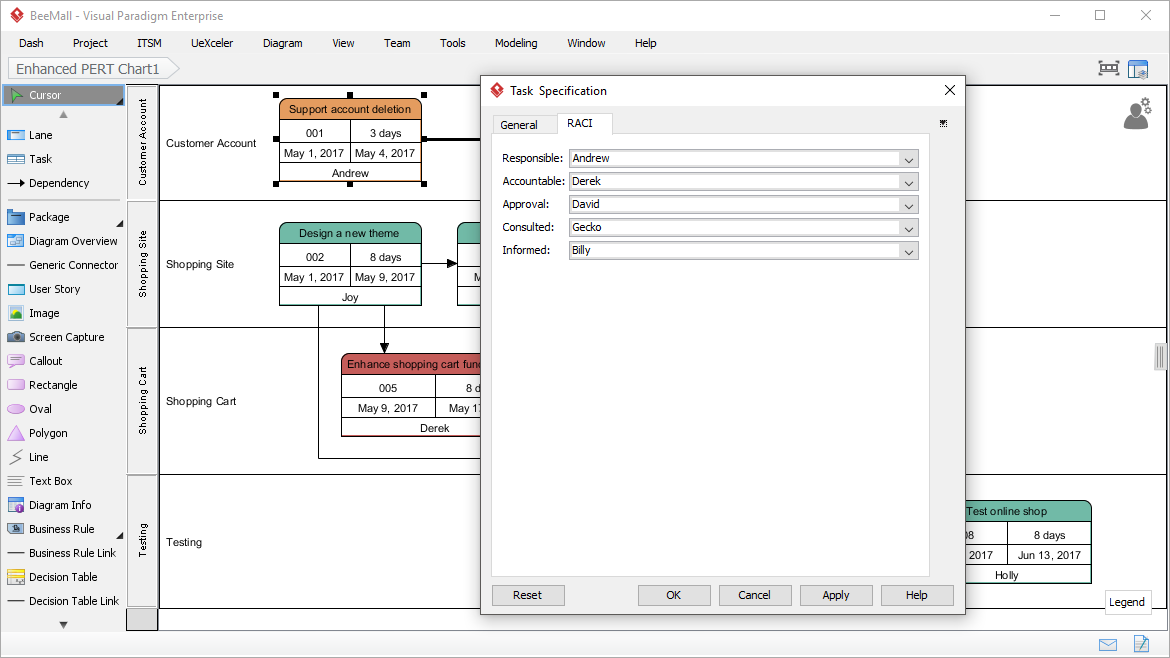
The screenshot provided demonstrates the “Task Specification” dialog, specifically the RACI tab. Here is how you configure these roles to optimize your project workflow.
1. Accessing the Task Specification
To define the RACI for a specific task, right-click on the task node within your PERT Chart (or double-click it) and select Task Specification. This opens the configuration dialog seen in the image.
2. Assigning the “Responsible” Role
The most critical field for synchronization is Responsible. In the example, the task “Support account deletion” is assigned to Andrew.
When you synchronize the PERT Chart to a Task Manager (or Team list), Visual Paradigm uses this assignment to populate the member’s task list automatically. Only the person marked as “Responsible” will see the task in their personal to-do list.
3. Defining Approval and Consultation
The remaining fields refine the governance of the task:
- Accountable: In the example, “Derek” is accountable. Even though Andrew does the work, Derek is the one who must sign off on the quality.
- Approval: This acts as a specific gatekeeper for the task. “David” must approve the work before it can proceed to the next stage.
- Consulted: “Gecko” is consulted. If Andrew runs into a technical issue, he knows to ask Gecko.
- Informed: “Billy” is informed. Once the task is complete, Billy receives a notification or report.
The Synchronization Flow
The true power of this feature is revealed when the system synchronizes with the task manager. The flow operates as follows:
- Assignment: The task appears in the list of the member who is Responsible (e.g., Andrew).
- Execution: The responsible member works on the task.
- Completion: When the task is marked as complete, the system triggers the RACI flow scheme. This means the task logic moves forward based on the defined chain of approval and notification, ensuring the workflow adheres to the organizational structure.
Visualizing the Data Structure
Internally, the system maps the task ID (e.g., 001) and the duration (3 days) alongside these human roles. The resulting data structure resembles the following logic:
  Andrew
  Derek
  David
  Gecko
  Billy
Conclusion
By utilizing the RACI feature within Visual Paradigm’s Enhanced PERT Chart, you move from simple time management to comprehensive resource management. It ensures that every task has a clear owner and a defined path for quality assurance, bridging the gap between project planning and execution.