
In the world of software engineering and system architecture, models are not static artifacts; they are living documents that evolve alongside the software they represent. Traditionally, making changes to a diagram—such as adding a new error handling branch to a flowchart or refactoring a sequence of database operations—required tedious manual editing of code. In the past, a single structural change often meant manually retyping dozens of lines of PlantUML or Mermaid syntax, a process prone to syntax errors and visual inconsistencies.
Visual Paradigm’s VPasCode (Diagram-as-Code Tool) revolutionizes this workflow by introducing Interactive AI Diagram Code Modification. This feature bridges the gap between human intent and machine precision, allowing you to instruct the AI to modify existing code directly within the editor using natural language.
The Architecture of AI-Assisted Modeling
The core of this functionality lies in the integration of Large Language Models (LLMs) directly into the diagram editor. Instead of treating the code editor as a simple text input, VPasCode treats it as a programmable interface.
- Natural Language Processing (NLP): The system parses your plain English instructions, such as “Add an alternate payment failure branch,” and translates this intent into specific syntax modifications.
- Syntax Preservation: Unlike some AI tools that generate entirely new code from scratch, this tool modifies the existing script. It respects your current formatting, styling (CSS classes), and structural logic, ensuring the diagram remains consistent with your project’s standards.
- Visual Feedback Loop: The output is not just text. The system immediately compiles the modified code, updating the visual representation of the diagram in real-time.
Step-by-Step: How to Execute AI Modifications
To leverage this powerful feature, follow this systematic approach to refactor your diagrams efficiently.
1. Initiating the Command
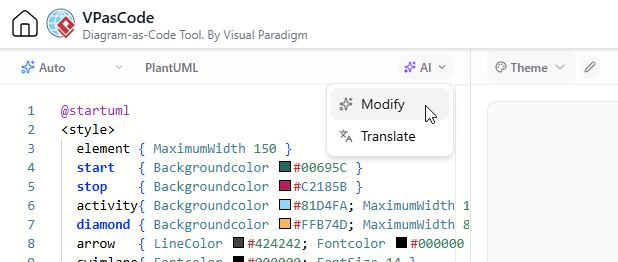
Open your PlantUML or Mermaid script in the VPasCode editor. Locate the AI button situated in the toolbar directly above the code editor. Clicking this reveals a context menu. Select the Modify option. This action signals the AI engine to enter “Modification Mode,” where it will analyze the current context of your script.
2. Crafting Your Instruction
Type your refactoring instruction in natural language. The AI is designed to understand high-level architectural requests. Here are three common scenarios:
- Refactoring: “Simplify this sequence diagram by grouping the database operations.”
- Extending Logic: “Add an alternate payment failure branch to this flowchart.”
- Structural Conversion: “Convert this standard class diagram into a C4 container model.”
3. Executing and Verifying
Once your instruction is entered, click AI Modify. The system processes the request and updates your script automatically. You will see the changes reflected in the code panel, and the diagram preview will update instantly.
Deep Dive: The Code Diff Window
Transparency is crucial when relying on AI to alter technical specifications. VPasCode provides a View Details option to launch a side-by-side code diff window. This feature is essential for auditing changes before finalizing them.
By inspecting the exact line-by-line changes, you can verify that the AI has:
- Correctly interpreted the variable names.
- Maintained the integrity of existing styles (colors, shapes).
- Inserted logic in the correct logical block.
Below is an example of how the code structure might look before and after an AI modification, demonstrating the precision required in diagram-as-code syntax:
@startuml
title Payment Flow

actor User
box "Payment System"
  participant "PaymentProcessor"
  participant "Database"
end box

User -> PaymentProcessor : Initiate Payment
PaymentProcessor -> Database : Check Balance
Database -->> PaymentProcessor : OK
PaymentProcessor -> User : Success
@endumlConclusion
The introduction of AI-driven code modification in VPasCode represents a significant shift in how architects and developers interact with their diagrams. By moving away from manual line-editing to a conversation-based approach, teams can iterate faster, reduce syntax errors, and focus on the architecture itself rather than the markup. Whether you are converting a standard class diagram into a C4 container model or refactoring a complex sequence diagram, the AI acts as a powerful partner in your modeling workflow.