
In modern software development, architectural diagrams are often treated as secondary artifacts—drawn once, quickly outdated, and rarely revisited. The gap between implementation and documentation widens with every sprint, leaving teams with stale visuals that no longer reflect reality. This is the core problem that VPasCode solves.
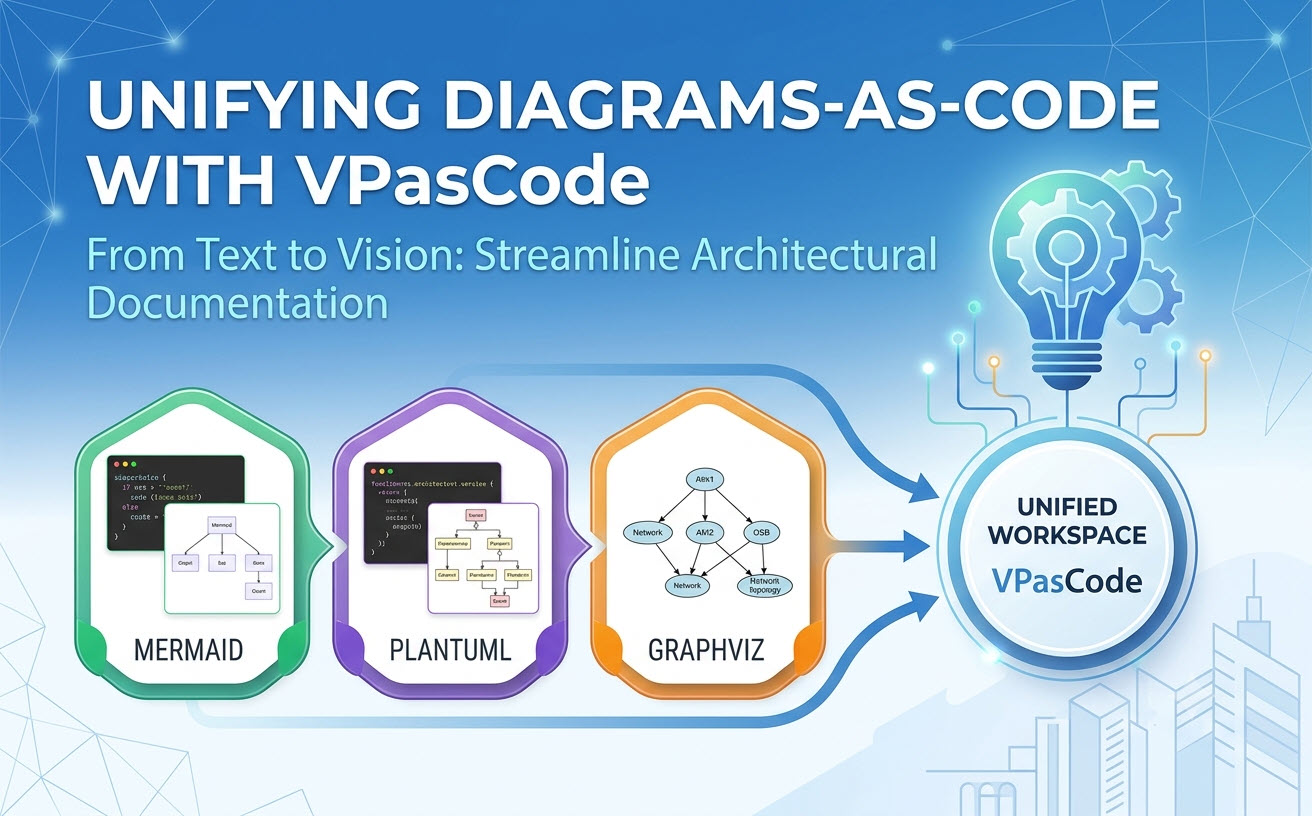
VPasCode is Visual Paradigm’s unified diagram-as-code tool and modern text-to-diagram platform. As illustrated in the architectural overview below, it brings together the distinct strengths of three major diagramming languages—Mermaid, PlantUML, and Graphviz—into a single, AI-powered cloud-native workspace.
The Architecture of Unified Documentation
The visual architecture presented in the system diagram demonstrates a “converge” pattern. On the left, we see three distinct syntax engines (Mermaid, PlantUML, and Graphviz) representing different modeling philosophies. Arrows flow from these individual languages toward a central Unified Workspace, indicating that VPasCode normalizes these disparate inputs into a cohesive visualization environment.
1. Mermaid: The Modern Web Standard
The green hexagon in the diagram represents Mermaid. Known for its simplicity and native support in platforms like GitHub and GitLab, Mermaid excels at generating flowcharts and sequence diagrams using plain text. VPasCode allows you to leverage this familiar syntax without leaving your IDE.
2. PlantUML: The Structured Modeling Powerhouse
The purple hexagon represents PlantUML. This language is a favorite among enterprise architects for its ability to define complex relationships, such as UML class diagrams and component diagrams, using a robust, script-based approach. VPasCode integrates this capability to handle detailed structural modeling.
3. Graphviz: The Graph Theory Engine
The orange hexagon represents Graphviz. Rooted in graph theory, Graphviz is the industry standard for automating the layout of complex network topologies. VPasCode unifies this powerful engine, allowing users to generate network diagrams that are difficult to render manually.
Step-by-Step: Modeling with VPasCode
VPasCode bridges the gap between “Text” and “Vision” by allowing users to type code that instantly renders into diagrams. Here is how the workflow functions within the unified workspace:
- Input via Natural Language or Code: Users can type natural language prompts (e.g., “Create a network topology with 3 nodes”) or write specific syntax for the chosen engine (Mermaid, PlantUML, or Graphviz).
- AI Interpretation: The integrated AI engine parses the input. If using natural language, it translates the intent into the correct underlying code syntax for the selected diagram type.
- Unified Rendering: The diagram is generated in real-time within the editor, providing immediate visual feedback.
- Export and Integration: The resulting diagram can be exported or kept within the workspace for version control and documentation.
Code Example: The Unified Output
Regardless of whether the user starts with Mermaid or PlantUML, VPasCode presents the final output in a consistent, unified format. Below is an example of a Mermaid flowchart code that VPasCode can process and render:
graph TD
    A[Start] --> B{Is it Work?}
    B -- Yes --> C[Process Data]
    B -- No --> D[Relax]
    C --> E[Finish]
    D --> E
Why Unification Matters
Before VPasCode, teams often had to choose one tool for their entire documentation lifecycle. If a team used PlantUML for architecture but needed a Mermaid diagram for a quick README update, they had to switch contexts or tools. VPasCode eliminates this friction.
By unifying these languages, VPasCode ensures that the “gap between implementation and documentation” is closed. It allows developers to treat diagrams as code—version-controlled, editable, and instantly generated—ensuring that the visual representation of the system always matches the codebase.