
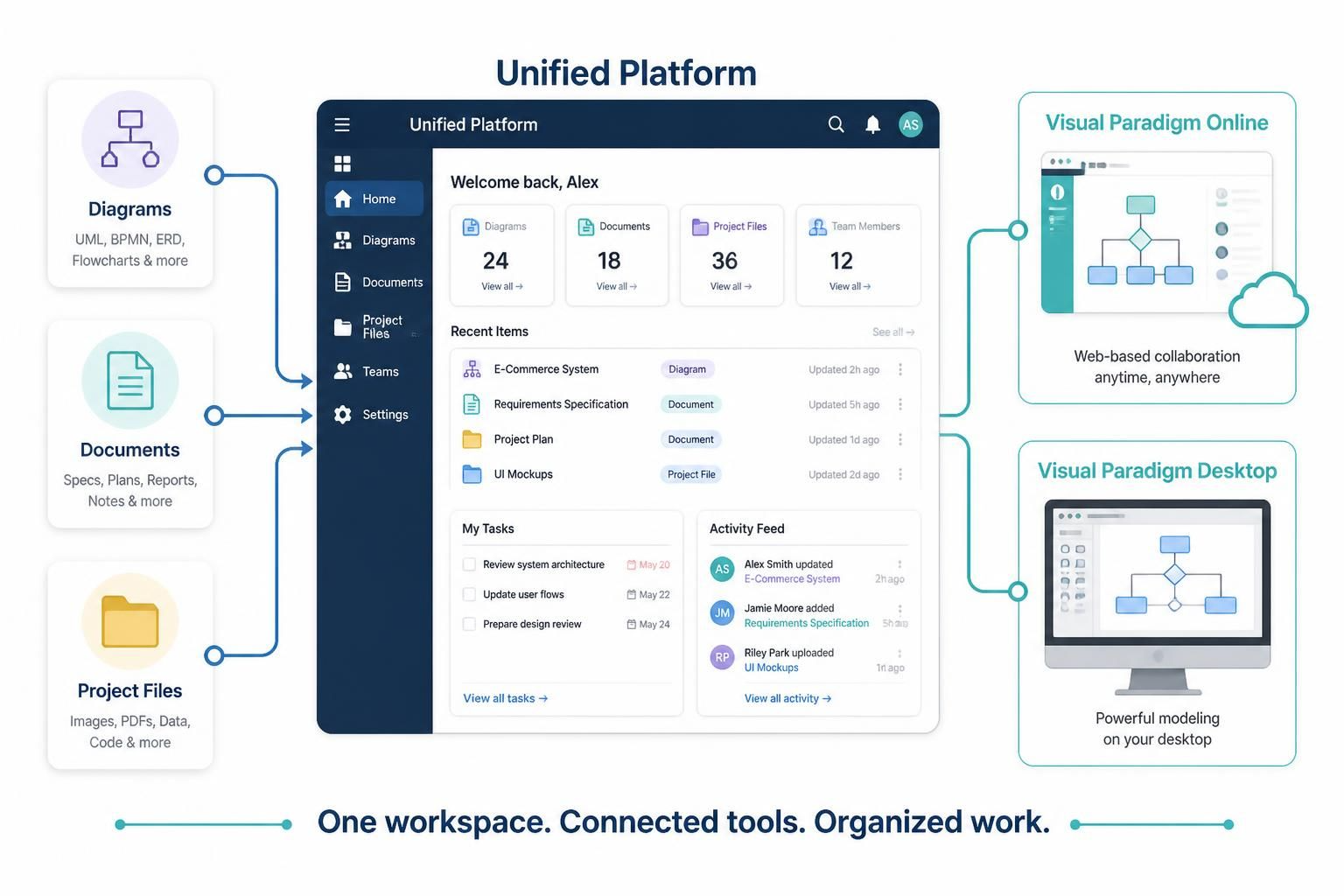
In the modern landscape of software architecture and systems engineering, the fragmentation of tools often leads to “siloed” data. Diagrams live in one place, requirements in another, and code in a third. Visual Paradigm has addressed this challenge by creating the Unified Platform. This architecture is not just a dashboard; it is a central nervous system for your engineering data, designed to synchronize the lightweight, collaborative nature of the web with the heavy-lifting power of desktop modeling.
Understanding the Ecosystem Architecture
The core of the Visual Paradigm ecosystem lies in the seamless integration between two distinct environments. To understand how the Unified Platform works, we must first deconstruct its two pillars:
- Visual Paradigm Online (The Cloud): This is the web-based interface designed for collaboration, accessibility, and lightweight editing. It allows team members to access diagrams, documents, and project files from any device with a browser. The architecture here prioritizes real-time updates and sharing capabilities.
- Visual Paradigm Desktop (The Powerhouse): This is the advanced, installed environment (available on Windows, macOS, and Linux). It provides the deep computational engine required for complex modeling, such as large-scale Enterprise Architecture, complex UML, and advanced BPMN simulations. It often handles the heavy processing that web browsers cannot.
The Unified Platform acts as the “Single Source of Truth.” When you open a project in the Desktop environment, it connects to the cloud repository. Conversely, changes made by a stakeholder in the Online environment are instantly reflected in the Desktop workspace. This ensures that whether you are sketching a quick flowchart on a tablet or running a full system simulation on a workstation, you are working with the same data.
The Central Dashboard: Managing Workflows
The user interface of the Unified Platform serves as the command center. As shown in the platform’s design, it aggregates different types of work artifacts into a cohesive view. This is critical for maintaining context. Instead of switching tabs between a Word document for requirements and a separate application for diagrams, the platform unifies them.
The dashboard typically organizes data into the following logical groups:
- Diagrams: Access to all visual representations, including UML (Unified Modeling Language), ERD (Entity Relationship Diagrams), BPMN (Business Process Model and Notation), and flowcharts.
- Documents: Centralized storage for requirements specifications, project plans, reports, and technical notes.
- Project Files: A repository for supporting assets such as images, PDFs, data sets, and code snippets.
- Teams & Activity: A social layer that tracks who updated what and when, ensuring team alignment.
This consolidation reduces the “cognitive load” on the engineer. You no longer have to remember which folder a specific diagram is in; the Unified Platform indexes and presents the resources based on your current project context.
Integrating Modeling Concepts
The Unified Platform enables a specific workflow known as Iterative Model-Based Systems Engineering (MBSE). In this workflow, the model is not just a drawing; it is the database. The platform allows you to:
- Trace Requirements to Design: Link a requirement document directly to the specific UML class or sequence diagram that implements it.
- Synchronize Data: If a database schema changes in the ERD, the Unified Platform can propagate that change to the data model or code generation scripts.
- Collaborative Validation: A business analyst can review the process flow in the Online environment, while the architect refines the detailed logic in the Desktop environment.
Practical Application: The “One Workspace” Strategy
To maximize the utility of the Unified Platform, you should adopt a workflow where the Desktop is used for creation and deep editing, while the Online environment is used for review and approval.
For example, imagine a team building an E-Commerce System. The architect works on the complex sequence diagrams in the Desktop application. Once a module is complete, the project is synced to the Unified Platform. The project manager then logs into the Online portal, reviews the “Recent Items” feed, and approves the design without needing to install any software. This fluid movement between the two environments is the true power of the platform.
Conclusion
By unifying the tools, resources, and data, Visual Paradigm eliminates the friction of managing separate repositories. Whether you are working with UML for software architecture, BPMN for business processes, or ERDs for database design, the Unified Platform ensures that your work is organized, accessible, and connected. It represents a shift from managing files to managing a living, breathing project ecosystem.