
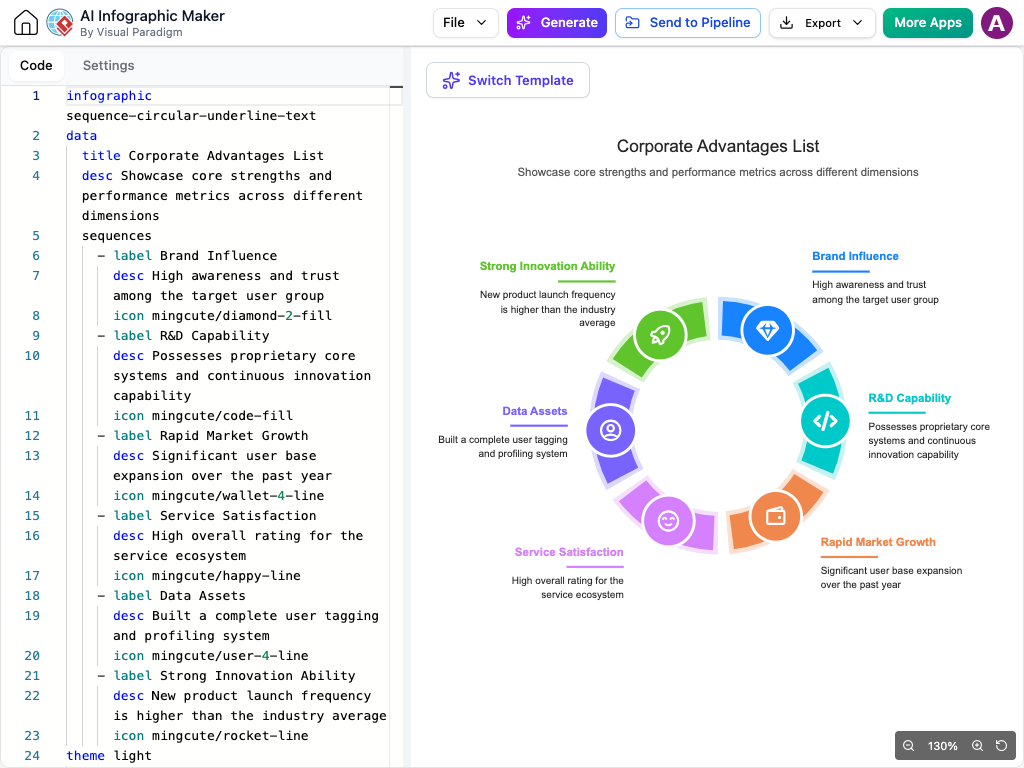
In the realm of technical documentation and knowledge management, presenting complex comparative data can be challenging. Linear lists often fail to emphasize the balance or equal weight of different data points. This is where circular infographics shine.
Based on the interface provided from Visual Paradigm’s AI Infographic Maker, this tutorial breaks down the underlying VPasCode (Visual Paradigm as Code) syntax used to generate a dynamic “Corporate Advantages List” visualization. We will explore how simple text-based commands translate into sophisticated graphical structures.
Understanding the Syntax Structure
VPasCode allows developers and technical writers to define diagrams using plain text. This approach offers version control capabilities and rapid generation, bypassing the need for manual drag-and-drop operations.
The code structure follows a hierarchical logic:
- Diagram Type: The initial command defines the overall shape.
- Metadata: The
titleanddescprovide context for the visualization. - Sequences: The container for individual data points.
- Attributes: Properties like
label,desc, andicondefine the content.
1. Defining the Geometry
The first line of the code snippet determines the visual topology of the diagram. In this example, the command sequence=circular-underline-text is used.
- Sequence: Indicates a list-based flow.
- Circular: Arranges nodes in a ring or donut shape, perfect for cyclic processes or equal-weight metrics.
- Underline-Text: Specifies that the text labels are positioned as underlines or captions near the nodes, rather than inside them.
2. The Data Block
The data block serves as the metadata container. It does not affect the geometry but defines the semantic meaning of the diagram.
data
title Corporate Advantages List
desc Showcase core strengths and performance metrics across different dimensions
sequences
3. Structuring the Sequences
The core logic resides in the sequences block. Each item in the list is indented to create a parent-child relationship between the data point and its attributes.
sequences
- label Brand Influence
  desc High awareness and trust among the target user group
  icon mingcute/diamond-2-fill
Notice the indentation rules:
- Top-level dash (-): Starts a new node in the sequence.
- Label: The primary text displayed on the graphic (e.g., “Brand Influence”).
- Description: The secondary text, usually the “desc” property, which provides the detailed explanation.
- Icon: A reference to a specific icon library to add visual flair.
Advanced Styling and Icons
One of the most powerful features of VPasCode is the integration of icon libraries. The syntax icon mingcute/[icon-name] allows for granular control over the visual representation of each node.
For instance, in the provided diagram:
- Strong Innovation Ability uses
mingcute/rocket-lineto symbolize speed and growth. - R&D Capability uses
mingcute/code-fillto represent technical development. - Service Satisfaction uses
mingcute/happy-lineto convey positive user sentiment.
The system automatically maps these text identifiers to their corresponding SVG or PNG assets, ensuring a consistent and professional look without manual asset management.
4. Theming
Finally, the theme property at the bottom of the script globalizes the styling.
theme lightThis single line ensures that the background, font weights, and color palettes adhere to a specific aesthetic (in this case, “light”), making the infographic ready for integration into bright, modern documentation standards.
From Raw Notes to Dynamic Visuals
The power of this system lies in its ability to transform unstructured text into structured visuals. As noted in the interface context, you can paste a project summary or type a descriptive prompt, and the built-in AI diagram generator will instantly draft a customized visual foundation.
Once generated, the system ensures Full Editability. You can tweak text copy, rearrange layout nodes, or update icon sets directly within the integrated editor. This means your technical documentation remains living and breathing, adaptable to the latest project requirements without breaking your page layout.