


Generate professional, standards-compliant enterprise architecture diagrams using natural language prompts — skip manual drafting and focus on strategic analysis.
🚀 Introduction
Visual Paradigm offers a powerful AI ArchiMate 4 tool that allows you to generate professional, standards-compliant enterprise architecture diagrams using natural language prompts. This tool is integrated directly into the Visual Paradigm Desktop and the AI Chatbot, enabling you to skip manual drafting and focus on strategic analysis. [1, 2, 3, 4]
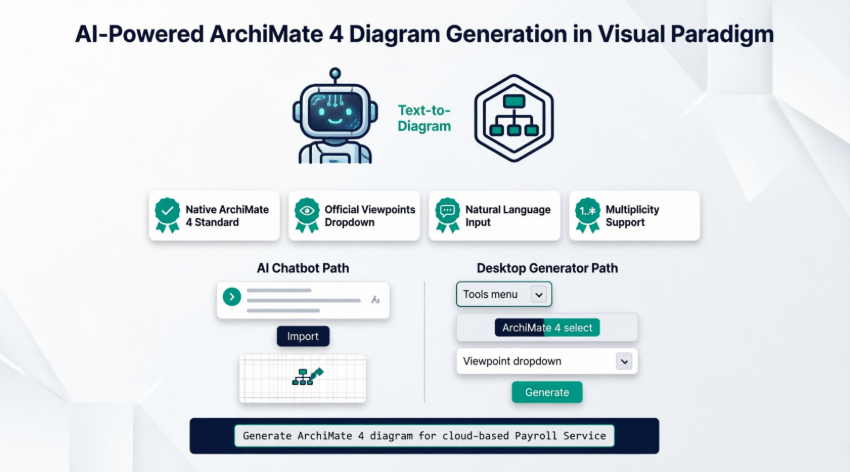
Whether you’re modeling cloud migrations, application portfolios, or capability maps, the AI ArchiMate 4 Generator accelerates your workflow while ensuring compliance with the latest ArchiMate 3.2/4.0 specifications.
✨ Core AI Features for ArchiMate 4
🔹 Native Diagram Generation
Generate “ArchiMate 4 Diagram” as a target standard, which uses the latest symbols for the Common Domain and excludes retired elements. This ensures your models remain future-proof and aligned with The Open Group’s official specifications.
🔹 Official Viewpoint Support
The AI tool includes a dedicated dropdown menu for official ArchiMate viewpoints, such as:
-
Application Usage
-
Implementation and Deployment
-
Capability Map
-
Motivation
-
Technology Usage
This ensures your generated model is tailored to specific stakeholder concerns instantly. [5, 8]
🔹 Text-to-Diagram Engine
By describing your architecture in plain English—such as “Generate an ArchiMate diagram for a cloud-based Payroll Service”—the AI automatically:
-
Selects the correct elements (Business Process, Application Component, Device, etc.)
-
Applies appropriate relationships (Serving, Realization, Association)
-
Structures the diagram according to ArchiMate 4 metamodel rules [3, 9]
🔹 Multiplicity & Cardinality Support
The tool supports the new ArchiMate 4 feature of native multiplicity on connectors (e.g., 1..*, 0..1), allowing for more precise relationship modeling between elements. This is critical for representing scalable architectures and dependency constraints. [6, 10]
🔹 Seamless Integration
-
Desktop Integration: Access via
Tools > AI Diagram Generation -
Chatbot Integration: Use the web-based AI Chatbot and import results directly into your project
-
Editable Output: All AI-generated diagrams are fully editable using Visual Paradigm’s native modeling tools [2, 11]
🛠️ How to Use the AI ArchiMate Tool
Method 1: Via AI Chatbot (Web-Based)
-
Open the AI Chatbot
-
Navigate to: https://ai-toolbox.visual-paradigm.com/app/chatbot/
-
Or access via Desktop:
Tools > Chatbot
-
-
Enter Your Architecture Description
-
Example prompt:
“Create an ArchiMate 4 diagram showing a cloud-based Payroll Service with Business Process ‘Process Payroll’, Application Component ‘PayrollApp’, and Technology Element ‘AWS EC2’, using the Application Usage viewpoint.”
-
-
Import into Visual Paradigm
-
Click Import Visual Paradigm
-
Select ArchiMate 4 as the target standard
-
The editable model appears in your workspace instantly [3, 4, 11]
-
Method 2: Via Desktop AI Generator
-
Access the AI Generator
-
In Visual Paradigm Desktop:
Tools > AI Diagram Generation
-
-
Configure Your Diagram
-
Choose ArchiMate 4 Diagram as the diagram type
-
Select an official Viewpoint from the dropdown (e.g., Capability Map)
-
Enter your topic or architecture description in natural language
-
-
Generate & Refine
-
Click Generate
-
Review the AI-proposed diagram
-
Use Visual Paradigm’s modeling tools to refine layout, add properties, or extend the model [2, 5, 8]
-
💡 Best Practices & Pro Tips
✅ Be Specific in Prompts
Include domain, elements, relationships, and viewpoint for best results:
“Generate an ArchiMate 4 Motivation viewpoint showing Business Goal ‘Improve Customer Satisfaction’ driven by Assessment ‘Low NPS Score’.”
✅ Leverage Viewpoints Early
Selecting the right viewpoint at generation time reduces manual restructuring later.
✅ Validate Multiplicity
After generation, review connector cardinality (1..*, 0..1) to ensure accurate dependency modeling.
✅ Iterate with AI
Use follow-up prompts to refine: “Add a Technology Service ‘Authentication API’ serving the PayrollApp component.”
✅ Export & Share
Generated diagrams support all Visual Paradigm export formats: PNG, PDF, SVG, and interactive HTML for stakeholder reviews.
📚 Reference List
-
ArchiMate Tools – Visual Paradigm: Official Visual Paradigm page detailing ArchiMate modeling tools and features for enterprise architecture.
-
Native AI ArchiMate 4 Generation with Viewpoints in Desktop: Release notes covering the integration of AI-powered ArchiMate 4 diagram generation with official viewpoint support in Visual Paradigm Desktop.
-
AI ArchiMate 4 Generator with Chatbot Import: Documentation on importing AI-generated ArchiMate 4 models from the Visual Paradigm AI Chatbot into your desktop workspace.
-
AI ArchiMate 4 Generator with Chatbot Import: Documentation on importing AI-generated ArchiMate 4 models from the Visual Paradigm AI Chatbot into your desktop workspace.
-
AI ArchiMate Viewpoints Generator: Feature release detailing AI support for official ArchiMate viewpoints to tailor diagrams to specific stakeholder concerns.
-
Maximizing Enterprise Architecture: Visual Paradigm 18.0’s Support for ArchiMate 4: Comprehensive guide exploring how Visual Paradigm 18.0 leverages ArchiMate 4 standards for enhanced enterprise architecture modeling.
-
Visual Paradigm ArchiMate 4 Support: Official announcement of full ArchiMate 4 standard support in Visual Paradigm, including new elements and relationship types.
-
Native AI ArchiMate 4 Generation with Viewpoints in Desktop: Release notes covering the integration of AI-powered ArchiMate 4 diagram generation with official viewpoint support in Visual Paradigm Desktop.
-
AI-Powered ArchiMate Diagrams: A Modern Guide to Enterprise Architecture Modeling: Modern guide demonstrating how AI integration accelerates ArchiMate diagram creation for enterprise architects.
-
Comprehensive Guide to ArchiMate 4 Support in Visual Paradigm 18.0: Detailed walkthrough of ArchiMate 4 features in Visual Paradigm 18.0, released in early 2026.
-
How to Generate and Import ArchiMate 4 Diagrams Using Visual Paradigm’s AI Chatbot: Step-by-step tutorial on leveraging the AI Chatbot to create and import ArchiMate 4 diagrams into Visual Paradigm Desktop.
🎯 Ready to get started?
Try this sample prompt in your AI Chatbot:
“Generate an ArchiMate 4 Capability Map showing ‘Digital Customer Engagement’ capability composed of ‘Social Media Management’, ‘CRM Integration’, and ‘Analytics Engine’ elements.”