
Imagine you’re a product manager tasked with launching a new patient portal for a large hospital system. You have a mountain of features—appointment scheduling, medical records, messaging, and more—but limited time and resources. How do you decide what to build first? Enter the MoSCoW Prioritization Framework Tool, an AI-powered solution that turns chaotic brainstorming into a clear, structured plan. This tool, powered by Visual Paradigm, guides you through a 5-step wizard to categorize your project’s requirements into “Must Have,” “Should Have,” “Could Have,” and “Won’t Have” buckets. In this deep dive, we’ll walk through a real-world example of using this tool to prioritize a “HealthTrack Patient Portal Implementation,” showing you exactly how it works from start to finish. It’s like having a seasoned product owner in your pocket, helping you make tough decisions with confidence.
Key Takeaways:
-
Use the MoSCoW Prioritization Framework Tool to structure and accelerate your project planning.
-
Start by defining your project context with a name, industry, and description to get AI-generated suggestions.
-
Follow the 5-step guided workflow to categorize features into Must Have, Should Have, Could Have, and Won’t Have.
-
Refine AI suggestions with detailed descriptions, reasons, dependencies, and responsible parties for each item.
-
Generate a professional final report to share with stakeholders and save your work locally for future use.
Getting Started: The AI-Driven First Step
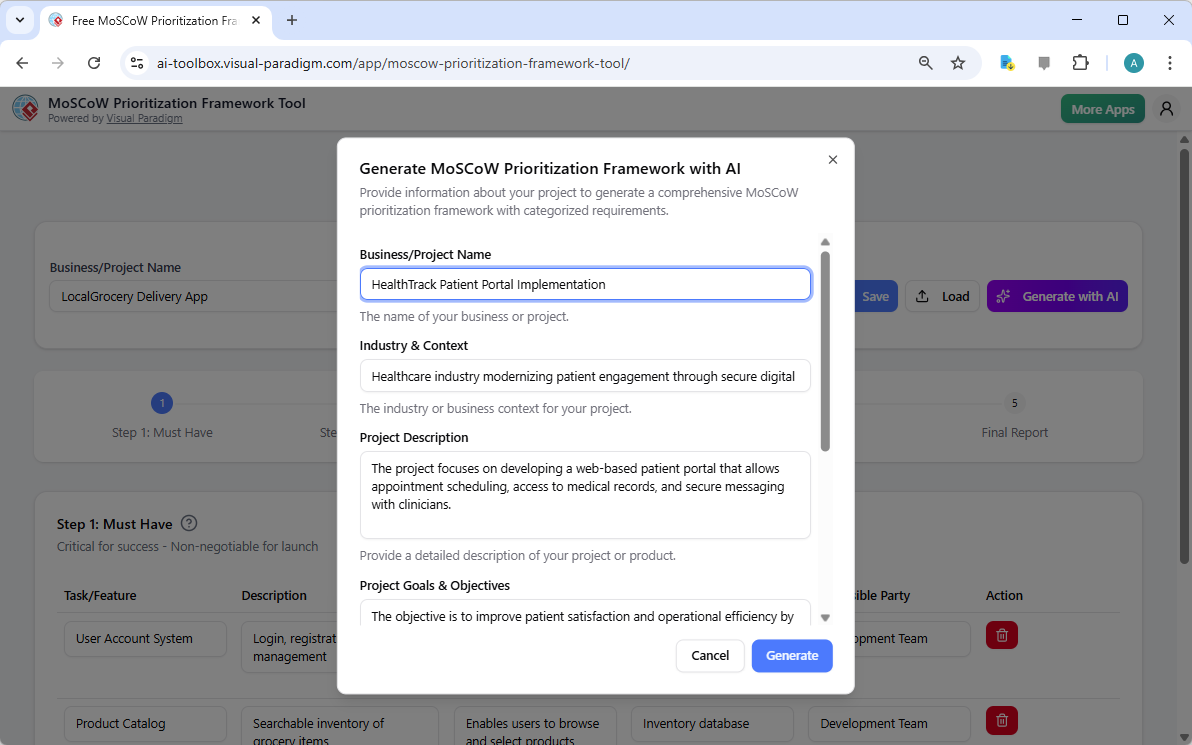
Let’s begin with the first step, as shown in Image 1. This is the AI generation screen, where you provide the foundational context for your project. The tool asks for your “Business/Project Name” and “Industry & Context.” In our example, we’re launching the “HealthTrack Patient Portal Implementation” in the healthcare industry, modernizing patient engagement. You also need to provide a detailed project description and goals. This information is crucial because it’s the fuel for the AI engine. By telling it about your project’s focus on secure digital platforms and its goal to improve patient satisfaction, the AI can generate relevant and realistic feature suggestions. The process is simple: input your details, click “Generate,” and let the AI do the heavy lifting of creating a first draft. It’s like asking a consultant for a preliminary strategy—only this one is powered by AI and ready in seconds.
Step 1: The “Must Have” Essentials
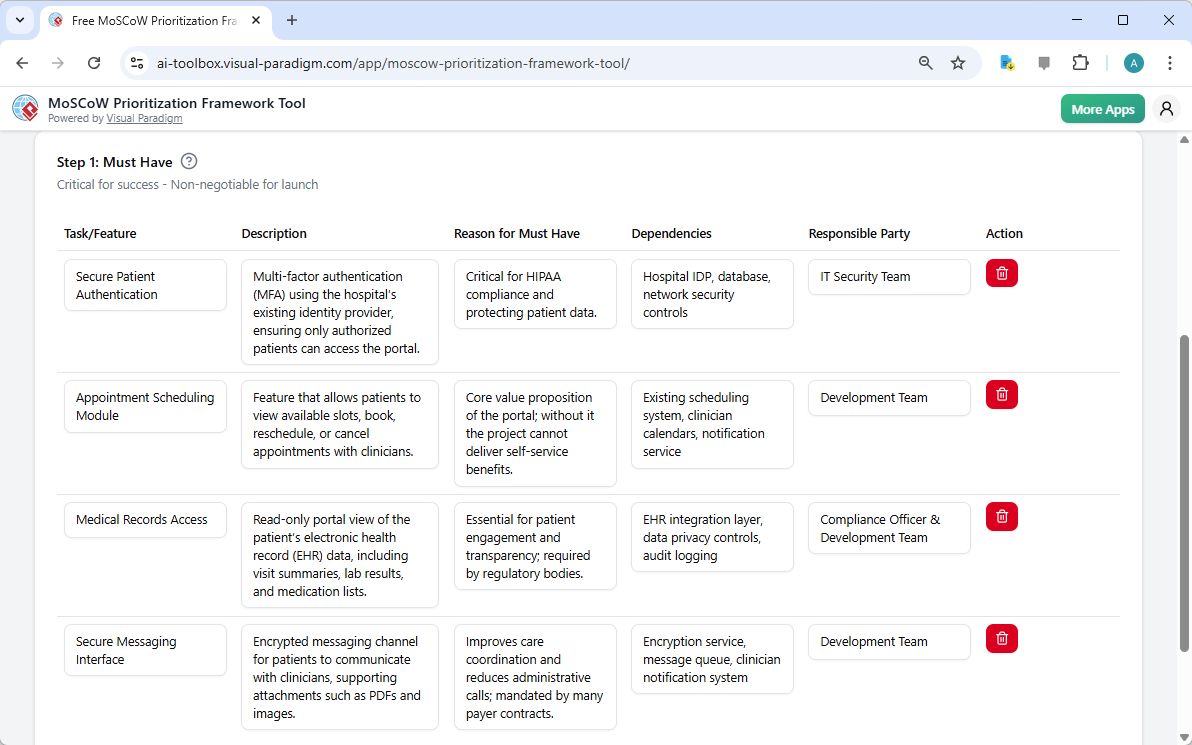
After the AI generates its initial list, you move to Step 1: Must Have, as seen in Image 2. This is the critical section where you identify the non-negotiable items that are essential for the project’s success. The AI has already populated the table with suggestions like “Secure Patient Authentication” and “Medical Records Access.” You can see that each item has a description, a reason for its priority, dependencies, and a responsible party. For example, the “Secure Patient Authentication” is deemed critical for HIPAA compliance, and it depends on the hospital’s existing identity provider. This level of detail is key. You can edit any of these fields to refine the AI’s suggestions or add your own. The goal is to ensure that the core value proposition of your portal—secure, self-service access to healthcare information—can be delivered. The “Must Have” items form the foundation of your project’s scope.
Step 2: The “Should Have” Value-Add Features
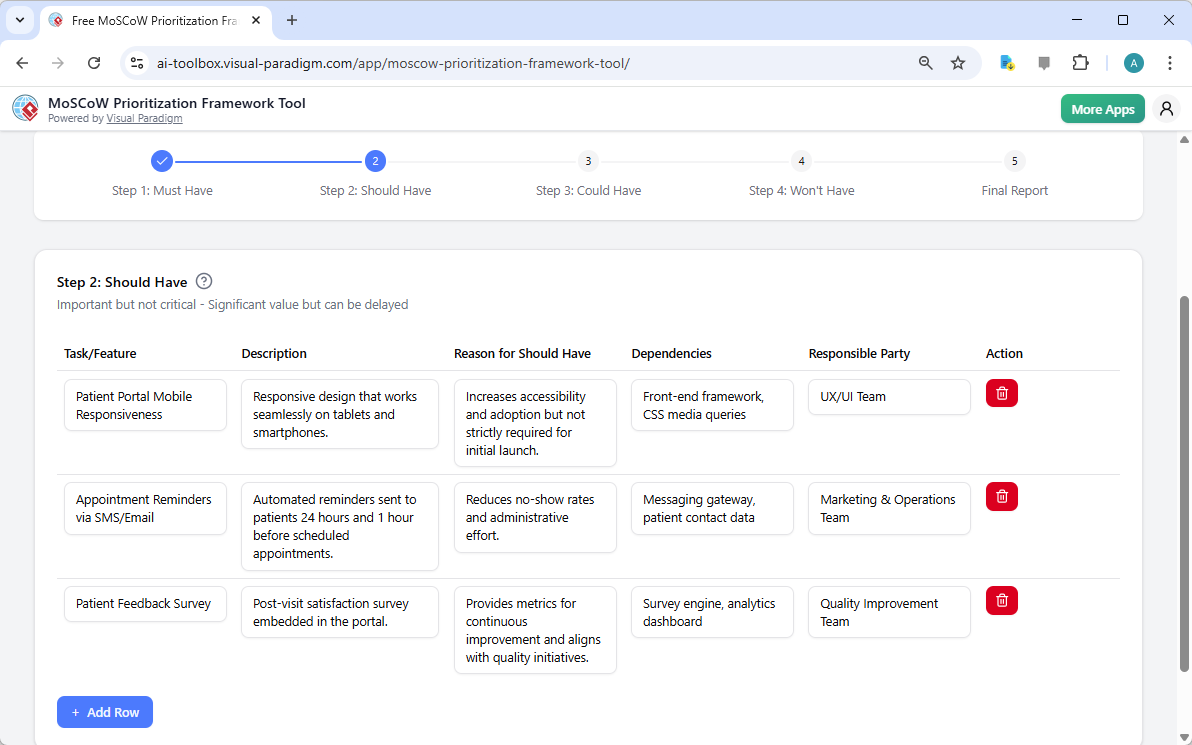
Now, we advance to Step 2: Should Have, shown in Image 3. This step focuses on features that are important and add significant value but aren’t critical for the initial launch. The AI suggests items like “Patient Portal Mobile Responsiveness” and “Appointment Reminders via SMS/Email.” These are the features that will make the portal more user-friendly and effective. For instance, the “Appointment Reminders” feature is designed to reduce no-show rates, a significant pain point for healthcare providers. The AI provides a reason for each suggestion, such as “Increases accessibility and adoption,” helping you justify the investment. You can easily add or remove items using the “Add Row” button. This step helps you build a strong foundation for the initial release while identifying features that will be crucial for long-term success.
Step 3: The “Could Have” Nice-to-Haves
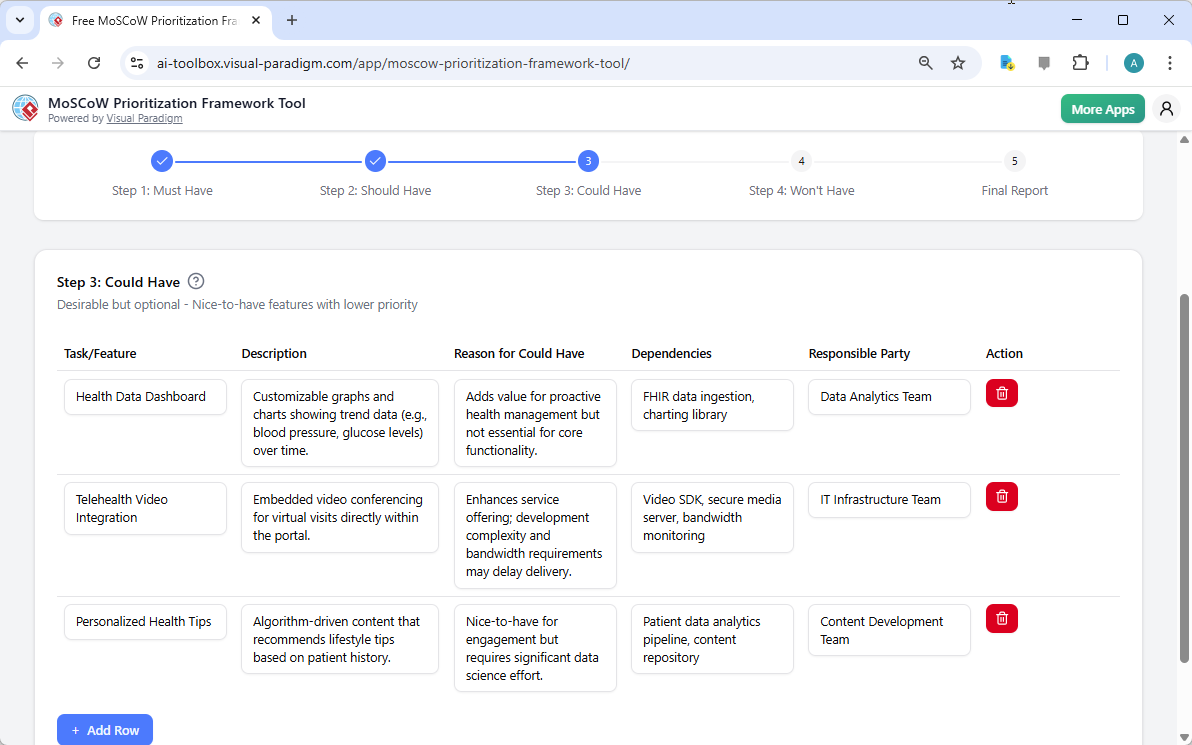
Next, we move to Step 3: Could Have, as displayed in Image 4. This is where the fun begins—features that are desirable but not essential. The AI suggests “Health Data Dashboard” and “Telehealth Video Integration.” These are nice-to-haves that could enhance the user experience, but they can be deferred if needed. For example, the “Health Data Dashboard” adds value for proactive health management but isn’t essential for the core functionality. The AI helps you identify these potential enhancements, allowing you to plan for future phases. You can also add your own “Could Have” items here. The key is to be realistic about your project’s scope and timeline. This step helps you manage expectations and avoid scope creep by clearly separating must-haves from nice-to-haves.
Step 4: The “Won’t Have” Items
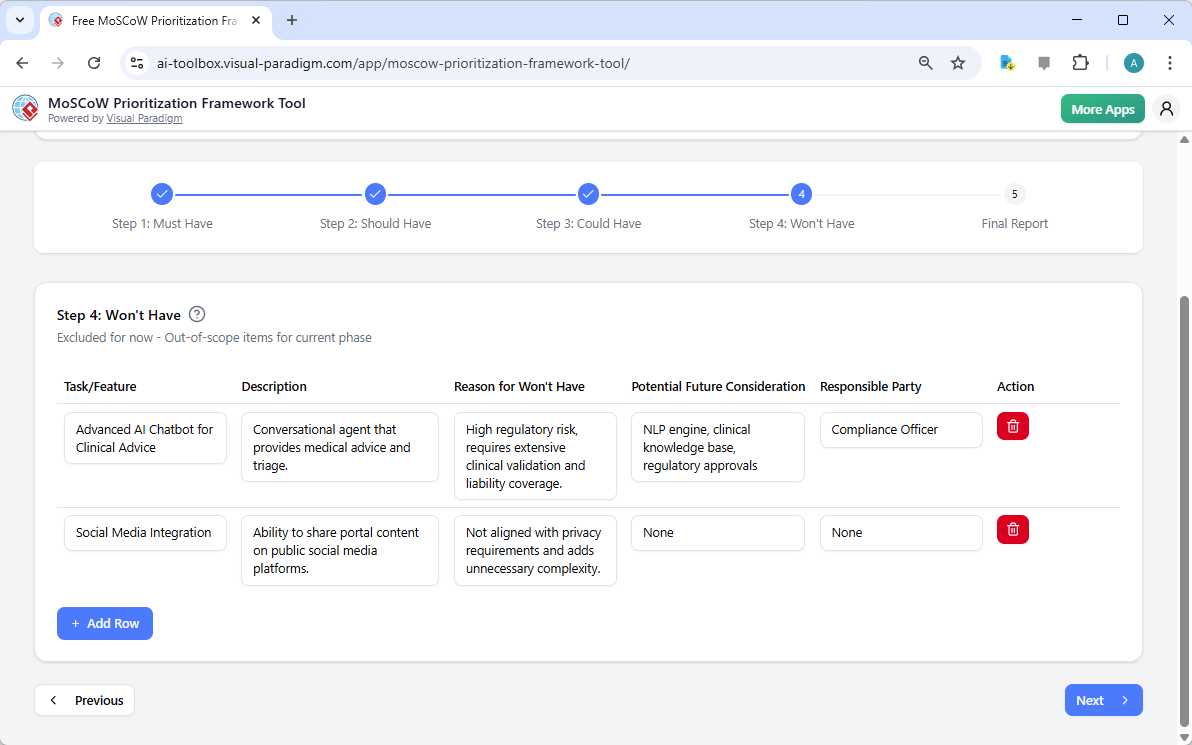
Now, we reach Step 4: Won’t Have, shown in Image 5. This is a crucial step for managing scope and setting clear boundaries. The AI suggests items like “Advanced AI Chatbot for Clinical Advice” and “Social Media Integration.” While these features might seem appealing, they are explicitly deemed out of scope for the current phase. The AI provides a “Reason for Won’t Have,” such as “High regulatory risk” for the AI chatbot, which is a very valid concern in the healthcare industry. This step forces you to make tough decisions and explicitly communicate what will not be delivered, preventing future misunderstandings. It’s a powerful way to manage stakeholder expectations and ensure the project stays focused on its core objectives. You can add your own “Won’t Have” items here to further refine the project’s scope.
Final Report: The Big Reveal
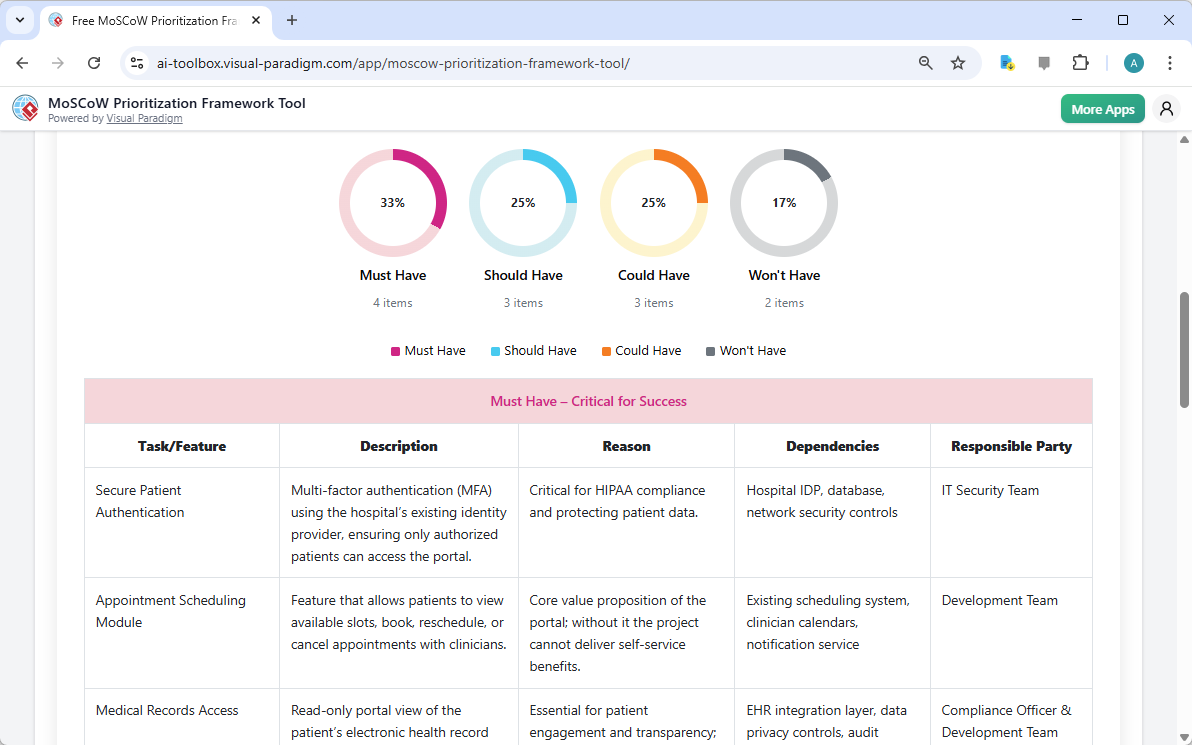
Finally, we arrive at the Final Report, as shown in Image 6. This is where all your hard work comes together in a professional, easy-to-understand format. The report features a clear pie chart that visually summarizes the distribution of your prioritized items: 33% Must Have, 25% Should Have, 25% Could Have, and 17% Won’t Have. This visual representation makes it easy to communicate the project’s scope and priorities to stakeholders. The report also includes a detailed table for each category, showing all the information you’ve entered: task/feature, description, reason, dependencies, and responsible party. This comprehensive report is the perfect document for presenting your prioritization plan to your team or leadership. You can print it or save it as a PDF to share with your stakeholders.
Conclusion: From Chaos to Clarity
Using the MoSCoW Prioritization Framework Tool is like having a personal project manager who knows the ropes. It takes the stress out of prioritization and turns a daunting task into a structured, guided process. By following the 5-step workflow—from the initial AI generation to the final report—you can quickly create a clear, actionable plan for your project. The tool’s AI-powered features save you time, while its structured tables ensure you don’t overlook critical details like dependencies and responsible parties. Whether you’re a product owner, project manager, or business analyst, this tool provides a powerful way to align your team, manage scope, and deliver projects that truly meet your users’ needs. It’s not just a tool; it’s a game-changer for project planning.
Ready to turn your project chaos into a clear, prioritized plan? Try the MoSCoW Prioritization Framework Tool today and experience the power of AI-driven prioritization.
Related Links
Visual Paradigm’s AI suite provides a broad array of intelligent tools designed to automate complex modeling tasks, from generating UML and enterprise architecture diagrams from natural language prompts to offering context-aware guidance through interactive assistants,,,. These tools enhance productivity by streamlining strategic analysis, software design, and digital content creation,.
-
AI-Powered Visual Modeling and Design Solutions: A central hub for AI-driven tools that accelerate development workflows through automated diagramming and software design.
-
Visual Paradigm AI Diagram Generation Guide: A step-by-step tutorial on leveraging AI-powered tools for fast and accurate diagram creation across various standards.
-
AI Chatbot – Intelligent Assistance for Visual Paradigm Users: An interactive assistant that delivers instant guidance, automates repetitive tasks, and converts text prompts into visual models,.
-
AI Textual Analysis – Transform Text into Visual Models Automatically: This tool analyzes text documents to automatically generate UML, BPMN, and ERD diagrams, significantly speeding up modeling and documentation.
-
AI-Powered Use Case Description Generator: An automation tool that creates detailed, structured use case descriptions from user input to support requirement engineering.
-
AI-Powered ArchiMate Viewpoints Generator: A specialized feature that automates the generation of ArchiMate viewpoints, ensuring accuracy and efficiency in enterprise architecture modeling.
-
DBModeler AI: Intelligent Database Modeling Tool: An AI-driven solution for automated database schema generation, normalization, and design optimization,.
-
AI-Powered C4 Diagram Generator: A generator supporting all four core levels of the C4 model—Context, Container, Component, and Deployment—for comprehensive architectural documentation.
-
AI-Powered SWOT and TOWS Business Analysis Tool: An analytical tool that uses artificial intelligence to transform SWOT findings into actionable strategies through the TOWS matrix,.
-
Lumina AI Slideshow Maker: Create Stunning Presentations with AI: A tool that converts simple text into professional-quality slides and animated presentations using generative AI,.