
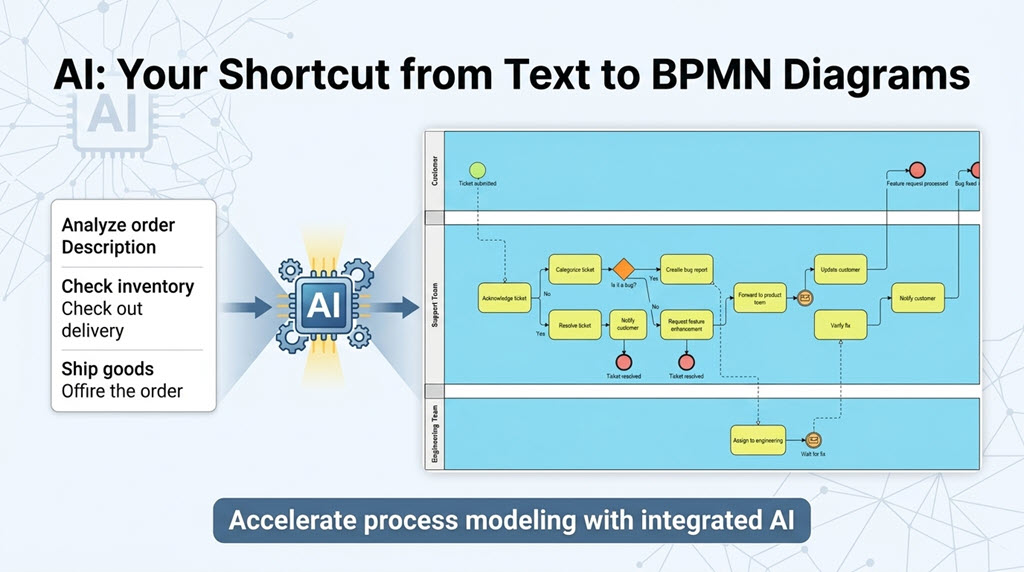
In the modern landscape of business analysis, the bottleneck is often not the lack of process understanding, but the time required to translate that understanding into a standardized diagram. Visual Paradigm has revolutionized this workflow by introducing an integrated AI engine that acts as a bridge between natural language descriptions and professional BPMN 2.0 diagrams. This tutorial explores the architecture of this system, the underlying modeling concepts, and the step-by-step workflow for creating production-ready process models.
The AI Modeling Architecture
Visual Paradigm’s AI Generator functions as an intelligent interpretation engine. Rather than simply drawing shapes based on keywords, the system operates through a four-stage pipeline designed to ensure semantic accuracy and compliance with international standards.
1. Natural Language Input
The process begins with the user describing a business process in plain English. This input serves as the semantic seed for the generation engine. For example, a prompt such as “A customer support ticket resolution process for a SaaS company” provides the system with the high-level scope and context.
2. AI Interpretation Engine
Once the text is received, the AI engine performs a multi-layered analysis:
- Actor Identification: It detects entities mentioned in the text and suggests appropriate swimlanes (e.g., “Customer,” “Support Team”).
- Activity Mapping: It recognizes verbs and nouns describing actions and maps them to specific BPMN tasks (e.g., “Resolve ticket” becomes a Task node).
- Decision Recognition: It identifies conditional logic (e.g., “if bug,” “if approved”) and recommends the correct gateway types.
- Best Practice Application: It automatically applies BPMN 2.0 rules regarding symbol usage and flow direction.
3. Instant Diagram Generation
The engine then constructs a standards-compliant diagram. This is not a static image but an editable model containing:
- Proper Symbol Usage: Ensuring that Start, End, and Intermediate events are correctly defined.
- Valid Flows: Establishing logical sequence flows and message flows between swimlanes.
- Logical Gateways: Placing XOR or AND gateways where decision points exist.
4. Human Refinement
The AI output serves as a robust “draft” or “skeleton.” The final stage involves the business analyst using Visual Paradigm’s professional editor to refine the model. This includes adding specific business rules, defining data objects for audit trails, and validating the logic against actual organizational constraints.
Key Advantages of AI-Assisted Modeling
Adopting this AI-driven workflow shifts the analyst’s focus from the mechanics of drawing to the analysis of the process itself.
Speed: The 30-Second Draft
Traditional modeling requires hours of setup and drawing. With AI assistance, an initial draft is generated in 30 to 60 seconds. This allows analysts to quickly iterate on ideas and present concepts to stakeholders almost immediately.
Consistency and Compliance
One of the most common errors in manual modeling is the misuse of symbols (e.g., using a generic diamond instead of a specific gateway). Visual Paradigm enforces BPMN 2.0 standards in real-time. The AI validates symbol usage and sequence flow rules automatically, ensuring that the resulting diagram is technically correct.
Completeness and Gap Analysis
Human analysts often forget edge cases. The AI engine suggests elements that might be overlooked, such as:
- Exception paths (e.g., what happens if a system fails?).
- Timer events for Service Level Agreements (SLAs).
- Data objects required for audit trails.
Best Practices for Prompting the AI
To maximize the utility of the AI Generator, the quality of the input prompt is critical. The following strategies ensure the generated model is accurate and ready for refinement.
- Be Specific About Context: Avoid generic terms.
- ❌ Weak: “A loan process”
- ✅ Strong: “A personal loan application and approval process in a retail bank for amounts up to $50,000.”
- Mention Key Actors: Explicitly state who is involved to ensure the swimlanes are correctly structured.
- ❌ Weak: “An onboarding process”
- ✅ Strong: “An employee onboarding process involving HR, IT, the hiring manager, and the new employee.”
- Specify Decision Criteria: Define the conditions for your gateways clearly.
- ❌ Weak: “A support process with escalations”
- ✅ Strong: “A support process that escalates tickets unresolved after 24 hours or marked as high priority.”
- Note Special Requirements: Include constraints such as compliance needs (SOX, GDPR), integration points, or Service Level Agreements (SLAs).
From AI Draft to Production-Ready Model
Once the AI generates the initial diagram, the workflow transitions to human refinement. This ensures the model is not just structurally sound, but also operationally accurate.
Step 1: Validate Logic
Before finalizing the diagram, use Visual Paradigm’s process simulation tools. Walk through each path to check for:
- Dead Ends: Paths that do not lead to an End Event.
- Infinite Loops: Conditions that could cause the process to cycle indefinitely.
- Condition Verification: Ensure all decision conditions cover all possibilities (e.g., ensuring “Yes” and “No” paths are both defined).
Step 2: Add Detail
Enhance the model by including technical and data specifics:
- Data Association: Use data association tools to link specific inputs and outputs to tasks.
- System Integration: Specify the external systems or applications involved using the technology palette.
- Performance Metrics: Add custom properties to track key performance indicators (KPIs).
Step 3: Refine Notation
Make the diagram readable and professional by:
- Sub-processes: Collapse complex logic into sub-processes with a single click to reduce clutter.
- Annotations: Add notes to explain complex business rules.
- Error Handling: Include compensation events or error handling mechanisms using the appropriate palettes.
Step 4: Socialize and Iterate
Process modeling is a collaborative effort. Share the model via Visual Paradigm’s cloud workspace for stakeholder review. Utilize presentation mode to conduct process walkthroughs, and update the model based on feedback, maintaining a full version history of all changes.