
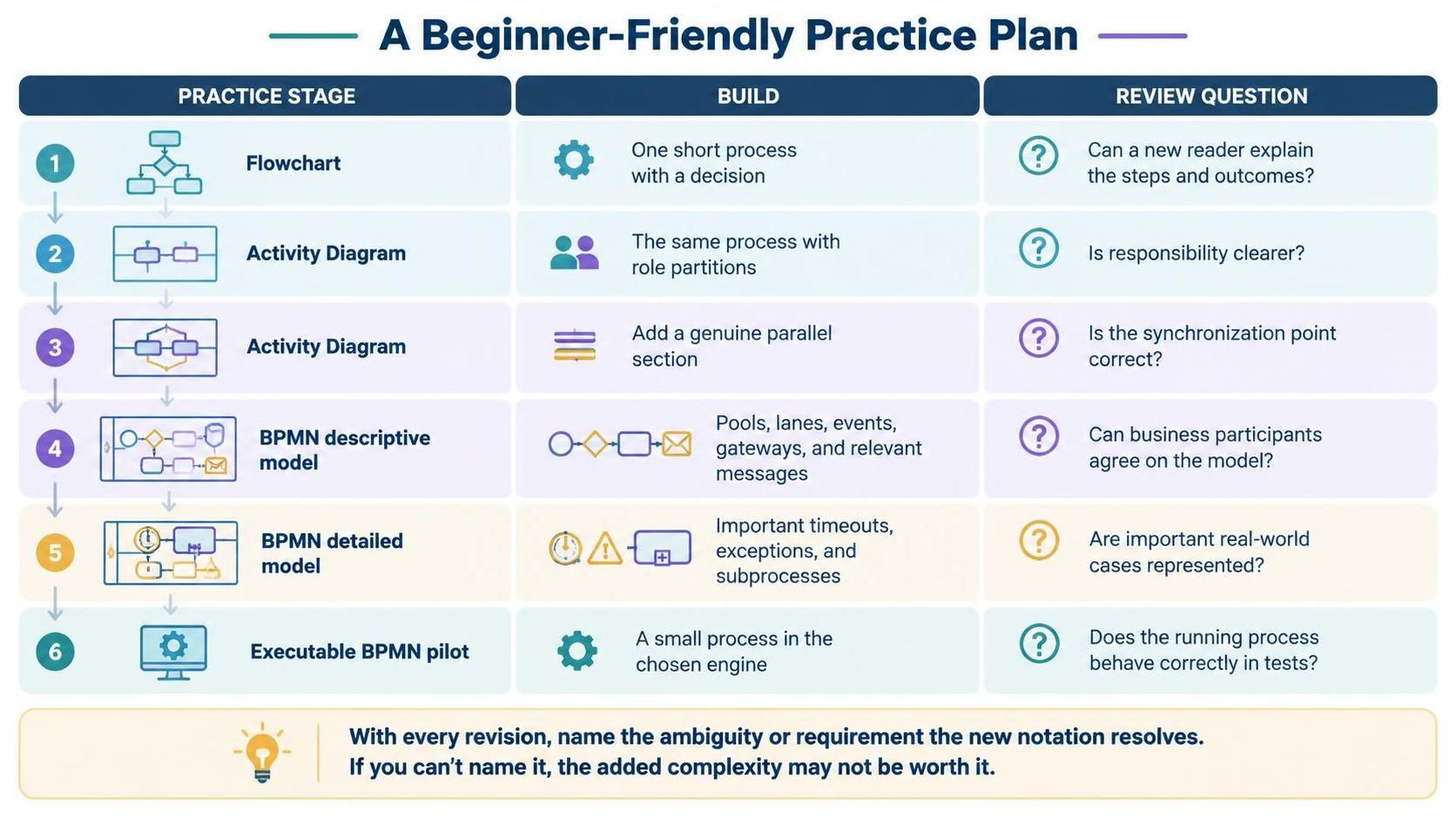
Modeling complex business processes can often feel like trying to drink from a firehose. Beginners frequently attempt to learn every notation standard simultaneously, leading to confusion and abandonment of the practice. However, effective architectural modeling relies on a strategy of progressive elaboration. Instead of mastering all notations at once, you should focus on a single deliverable at each stage of development.
This tutorial outlines a beginner-friendly practice plan designed to take you from a basic logical flow to a fully executable business process model using the Visual Paradigm ecosystem. By following this structured approach, you will understand exactly what value each layer of notation adds to your system architecture.
The Philosophy of Incremental Modeling
The core principle of this practice plan is to build complexity only when necessary. At each step, you must compare the new diagram with the previous one and explicitly identify the ambiguity or requirement that the new notation resolves. If you cannot name the problem that the added complexity solves, it is likely not worth the effort.
We will traverse six distinct stages, moving from simple logic to executable logic.
- Flowchart (Logical Flow): Establishing the basic steps.
- Activity Diagram (Responsibility): Adding role partitions.
- Activity Diagram (Concurrency): Handling parallel execution.
- BPMN Descriptive Model (Communication): Defining interaction and message flow.
- BPMN Detailed Model (Robustness): Incorporating exceptions and timeouts.
- Executable BPMN Pilot (Validation): Running the process in a real engine.
Stage 1: The Logical Foundation (Flowchart)
The journey begins with a Flowchart. This stage is about capturing the “Happy Path”—the primary sequence of events in a process. You are building a simple process with a decision point to demonstrate branching logic.
Build Focus
Create a short process that includes a standard decision diamond. The goal is not to capture every detail of the system, but to ensure the logic holds up under scrutiny.
Review Question
Present this model to a new reader. Ask them: “Can you explain the steps and outcomes?” If they cannot trace the path from start to finish, the logic is too complex or the symbols are ambiguous.
Stage 2: Adding Responsibility (Activity Diagram)
Once the logic is sound, the next layer of complexity is Responsibility. In a standard flowchart, everyone is doing everything. In a real business environment, different actors are responsible for different actions.
Build Focus
Transform your Flowchart into a UML Activity Diagram using swimlanes (or partitions). Map the same process steps to specific actors (e.g., “Customer,” “System,” “Manager”).
Review Question
Look at the diagram and ask: “Is responsibility clearer?” A well-structured Activity Diagram should make it obvious who is accountable for every step, eliminating the confusion of “who does what.”
Stage 3: Handling Concurrency (Parallel Activity Diagram)
Real-world processes rarely follow a perfectly linear path. Often, multiple tasks happen at the same time. This stage introduces the concept of Concurrency.
Build Focus
Add a genuine parallel section to your Activity Diagram. Use a Fork node to split the flow into parallel activities and a Junction node to merge them back together.
Review Question
Inspect the synchronization point. Ask: “Is the synchronization point correct?” Ensure that the flow waits for all parallel branches to complete before proceeding to the next step. Incorrect synchronization is a common pitfall in concurrency modeling.
Stage 4: Defining the Business Context (BPMN Descriptive Model)
Now that the internal logic is established, we must define how the process interacts with the outside world. This is where we transition to BPMN 2.0 (Business Process Model and Notation).
Build Focus
Create a BPMN Descriptive Model. This involves adding Pools (representing organizations or entities) and Lanes (representing roles). You will introduce Events (start, intermediate, end) and Gateways (decision points) alongside Messages that indicate communication between pools.
Review Question
Ask your business stakeholders: “Can business participants agree on the model?” The goal here is semantic alignment. The model should reflect the business’s understanding of who talks to whom and when.
Stage 5: Ensuring Robustness (BPMN Detailed Model)
A process model that only works when everything goes right is useless. The Detailed Model focuses on handling the unexpected.
Build Focus
Enhance the model by adding Timeouts (e.g., “If the order isn’t confirmed in 24 hours…”), Exceptions (error handling paths), and Subprocesses (decomposing complex tasks into their own diagrams).
Review Question
Review the diagram against real-world scenarios. Ask: “Are important real-world cases represented?” Does the model account for the user who never returns the email? Does it handle a system crash?
Stage 6: Validation (Executable BPMN Pilot)
The final stage moves from static documentation to dynamic execution. You are now building an Executable BPMN Pilot.
Build Focus
Take a small, well-defined process from your detailed model and deploy it into a chosen BPMN Engine (using VPasCode or OpenDocs). This involves converting the diagram into executable code or logic that the engine can run.
Review Question
Run the process. Ask: “Does the running process behave correctly in tests?” This is the ultimate test of your modeling. If the code behaves differently than the diagram suggests, the diagram was incomplete or incorrect.
Conclusion
By adhering to this practice plan, you avoid the trap of “boiling the ocean.” You start with a simple flow, clarify who is responsible, add parallelism, define the business context, handle exceptions, and finally validate the logic with code. With every revision, remember to name the ambiguity or requirement the new notation resolves. If you cannot name it, the added complexity may not be worth it.