
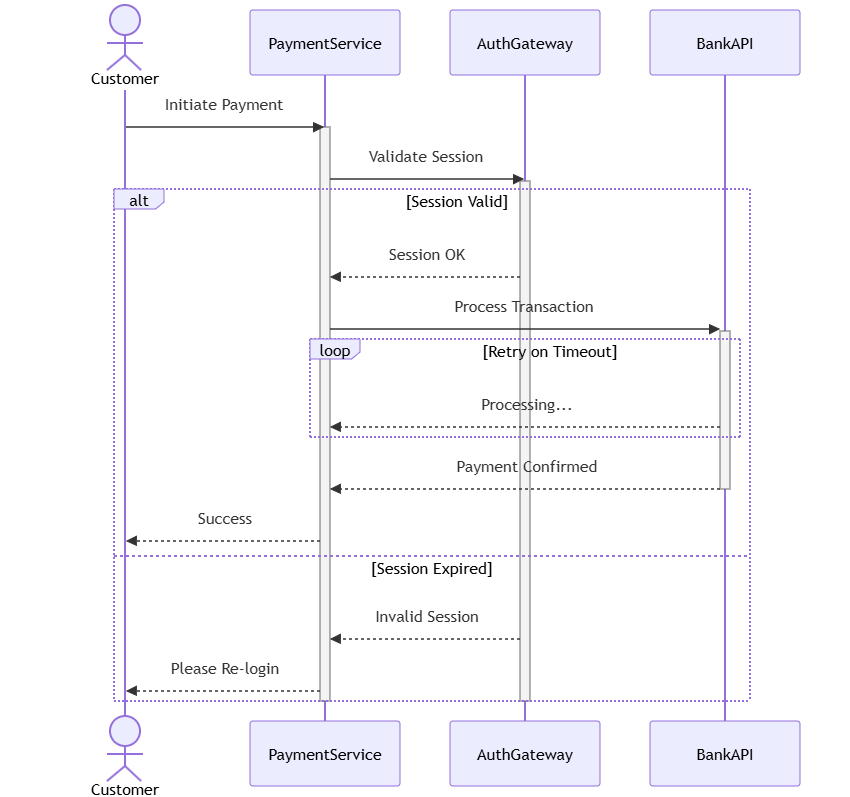
In the realm of software architecture, few diagrams are as critical for debugging and communication as the Sequence Diagram. Unlike static architecture diagrams that show “what” the system is, sequence diagrams illustrate “how” the system behaves over time. This is particularly vital for complex transactional systems, such as a payment gateway, where handling success paths, failures, and timeouts is the difference between a profitable business and a lost customer.
This tutorial breaks down a sophisticated payment processing flow using the Mermaid syntax within the VPasCode environment. We will analyze how to model conditional logic using the alt operator and iterative processes using the loop operator.
Understanding the Actors and Participants
Before diving into the syntax, we must identify the players in our system. A sequence diagram relies on clear definitions of who is initiating actions and who is processing them.
- Customer (Actor): Represented by the stick figure, this is the external user initiating the transaction.
- PaymentService (Participant): The core application logic that orchestrates the payment request.
- AuthGateway (Participant): A security component responsible for validating the user’s session token.
- BankAPI (Participant): The external banking system that actually processes the funds.
Modeling Conditional Logic with alt
Real-world systems rarely follow a single straight line. In our payment scenario, the system must handle two distinct scenarios: a valid session and an expired session. We model this using the alt (alternative) block.
The alt block divides the sequence into mutually exclusive paths. The diagram engine will render a dashed frame indicating the start and end of these alternatives.
alt Session Valid
    AuthGateway-->>PaymentService: Session OK
    PaymentService->>+BankAPI: Process Transaction
    # ... transaction logic ...
    PaymentService-->>Customer: Success
else Session Expired
    AuthGateway-->>PaymentService: Invalid Session
    PaymentService-->>Customer: Please Re-login
end
Key Insight: In the alt block, the else keyword is mandatory to define the alternative path. The conditionals (e.g., [Session Valid]) are placed on the top of the respective frames to describe the guard condition.
Handling Retries with loop
Network calls to external systems like BankAPI are notoriously unreliable. A robust system must anticipate timeouts. We model this using the loop block.
The loop block indicates that the enclosed messages will repeat. In this context, it represents a retry mechanism where the system waits for a response or retries the connection until a timeout occurs or success is reached.
loop Retry on Timeout
    BankAPI-->>PaymentService: Processing...
end
Visually, this creates a nested frame within the alt block, highlighting that the retry logic only applies during the successful session phase.
Visualizing Activation Bars
One of the most distinct features of a sequence diagram is the activation bar (the thin vertical rectangle on a lifeline). It shows when an object is actively performing an operation.
In Mermaid, we control this explicitly:
activate Participant: Starts the bar.deactivate Participant: Ends the bar.+Participant: Shorthand to start activation on a message.-Participant: Shorthand to end activation on a message.
By carefully placing activate and deactivate, you ensure the diagram accurately reflects the “stack depth” of the application.
The Complete Source Code
Below is the complete, runnable Mermaid code for this payment flow. You can copy this directly into your VPasCode editor or any Mermaid-compatible renderer.
sequenceDiagram
    actor Customer
    participant PaymentService
    participant AuthGateway
    participant BankAPI

    Customer->>PaymentService: Initiate Payment
    activate PaymentService

    PaymentService->>AuthGateway: Validate Session
    activate AuthGateway

    alt Session Valid
        AuthGateway-->>PaymentService: Session OK
        PaymentService->>+BankAPI: Process Transaction

        loop Retry on Timeout
            BankAPI-->>PaymentService: Processing...
        end

        BankAPI-->>-PaymentService: Payment Confirmed
        PaymentService-->>Customer: Success
    else Session Expired
        AuthGateway-->>PaymentService: Invalid Session
        PaymentService-->>Customer: Please Re-login
    end

    deactivate AuthGateway
    deactivate PaymentService
Conclusion
By mastering the alt, loop, and activation/deactivation syntax, you can transform a simple flowchart into a rigorous technical specification. This diagram not only documents the happy path of a payment but explicitly defines the safety nets (session validation and retry logic) that ensure system reliability.