
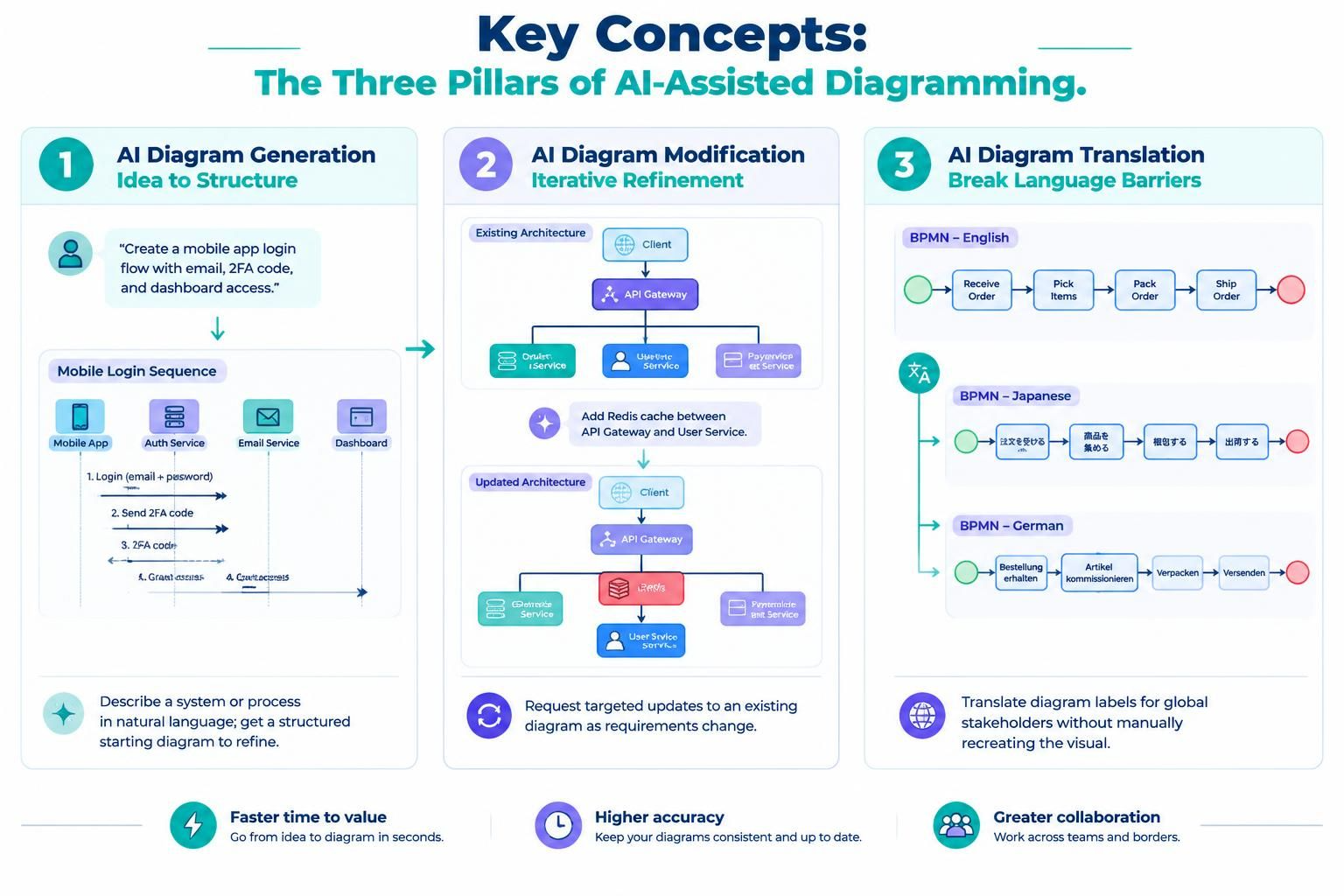
In the rapidly evolving landscape of software architecture and system design, the gap between conceptual thinking and visual representation has historically been a significant bottleneck. Engineers often spend hours manually positioning boxes and drawing connectors, taking them away from the core logic of their systems. Visual Paradigm addresses this friction through its embedded AI capabilities, specifically via the VPasCode interface. These capabilities are not merely shortcuts; they represent a fundamental shift in how we approach modeling, organized into three distinct pillars: Generation, Modification, and Translation.
1. AI Diagram Generation: The Concept-to-Canvas Bridge
The most immediate benefit of AI-assisted modeling is the ability to bypass the “blank canvas” syndrome. In traditional modeling, a user must understand the syntax of the modeling tool before they can even begin to visualize an idea. AI Diagram Generation in Visual Paradigm bridges the gap between natural language and structured visualization.
How It Works
Instead of starting with a blank canvas or writing complex code from scratch, users can describe a system, process, or relationship in plain English. The AI interprets this description and generates a foundational diagram structure. This is particularly powerful for Sequence Diagrams and Class Diagrams, where the interaction flow or object relationships are the primary focus.
Example Scenario: Mobile Authentication Flow
Imagine you are outlining a new user authentication flow for a mobile application. You do not need to manually place each node or draw the arrows between them. You can simply input a prompt into the AI interface:
"Create a sequence diagram showing a user logging in via email, receiving a two-factor authentication code, and then accessing the dashboard."The AI generates the initial sequence diagram, providing a solid starting point that you can immediately refine. It correctly identifies the actors (User, Mobile App, Auth Service) and the messages (Login, Send Code, Access Dashboard), saving you the setup time.
2. AI Diagram Modification: Iterative Refinement
Diagrams are rarely static; they evolve as requirements change. In traditional workflows, modifying a diagram often means deleting old elements and redrawing connections, which can lead to layout inconsistencies or accidental disconnections. AI Diagram Modification allows users to request specific updates to an existing diagram without rebuilding it.
The Agile Advantage
This capability is particularly useful for agile environments where scope adjustments are frequent. It ensures that the visual documentation remains consistent and up to date without requiring a complete rebuild. The AI understands the structural integrity of the diagram and can insert new nodes or reroute flows logically.
Example Scenario: Microservices Architecture Update
Consider a scenario where you have an existing class diagram for a microservices architecture. Mid-sprint, the team decides to add a new caching layer between the API gateway and the database service to improve performance.
Instead of manually dragging and connecting new elements, you can instruct the AI:
"Add a Redis cache component between the API Gateway and the User Service, and update the connections accordingly."The AI adjusts the diagram to reflect this new architectural decision instantly. It places the “Redis” component in the center and redraws the arrows from the API Gateway to the Cache, and from the Cache to the User Service, preserving the overall aesthetic of the diagram.
3. AI Diagram Translation: Breaking Language Barriers
In global teams, documentation must be accessible to stakeholders who may speak different languages. A diagram created in English might be difficult for a partner in Japan or Germany to interpret if the labels are not translated. AI Diagram Translation automatically converts the text labels within a diagram into another language, preserving the structural integrity of the visual while making it inclusive.
Global Collaboration
This tool transforms the way international teams collaborate. You no longer need to manually recreate diagrams or rely on external translation services that might disrupt the formatting. You can take a complex BPMN process map and instantly localize it.
Example Scenario: Supply Chain Workflow
You have prepared a detailed BPMN process map for a supply chain workflow, originally created in English. You need to share this with partners in Japan and Germany. Using the translation tool, you can convert all labels and descriptions into Japanese and German respectively.
For instance, a label like “Receive Order” becomes “注文を受ける” (Japanese) or “Bestellung erhalten” (German). This ensures that non-English speaking stakeholders can fully understand the process without manual re-creation, fostering greater collaboration across borders.
Conclusion
By integrating these three pillars—Generation, Modification, and Translation—Visual Paradigm’s AI tools significantly reduce the time-to-value for system modeling. They allow architects and developers to focus on the logic and design of the system rather than the mechanics of drawing it. Whether you are starting from a blank idea, refining a complex architecture, or sharing with a global team, the AI is there to streamline the process.