
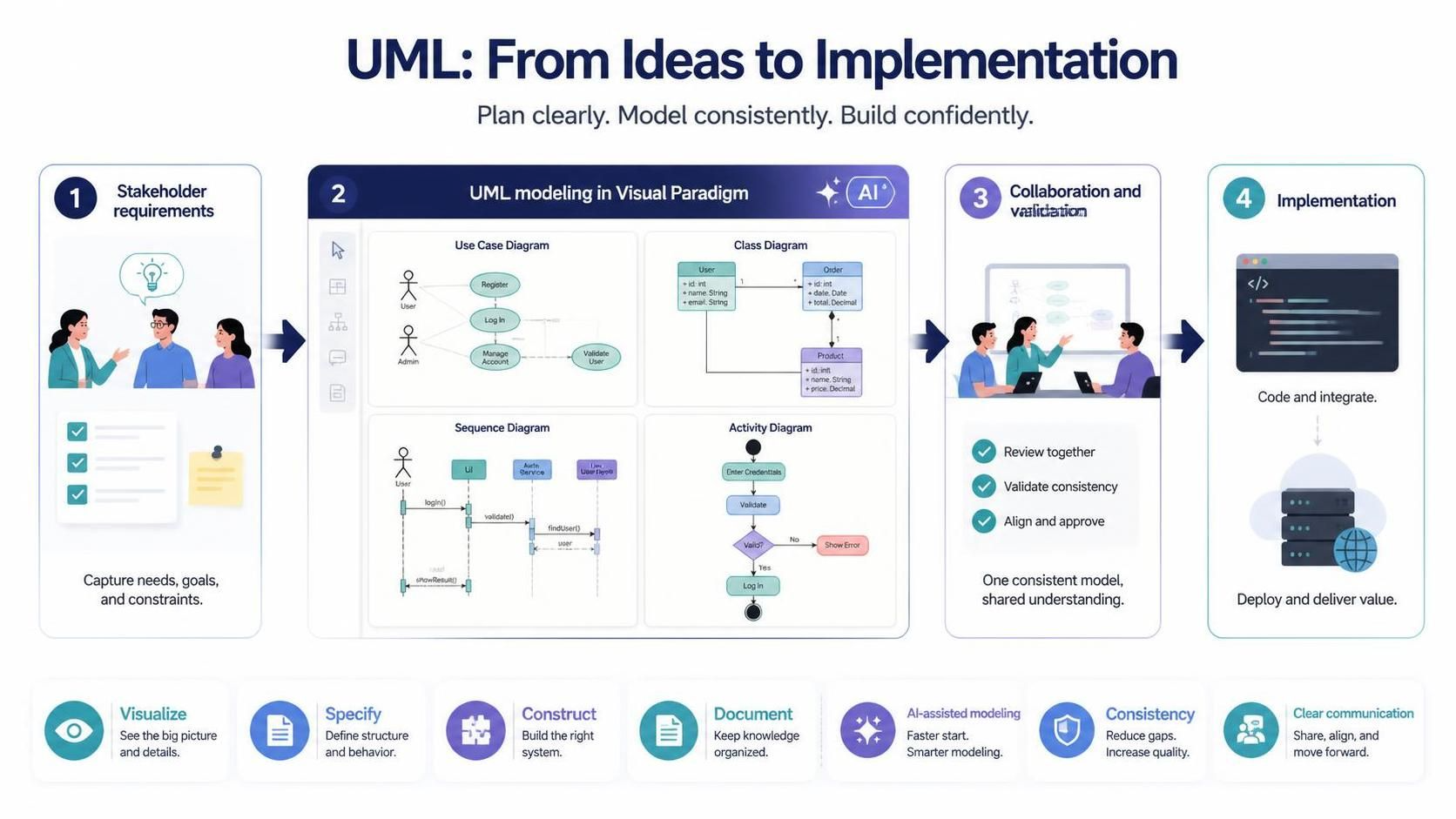
In the complex world of software development, clarity is king. Before a single line of code is written, successful projects rely on robust architectural planning and clear communication among stakeholders. Unified Modeling Language (UML) serves as the universal blueprint for software systems, allowing teams to visualize, specify, construct, and document the artifacts of a software-intensive system.
However, creating these diagrams manually can be time-consuming and prone to inconsistency. This is where Visual Paradigm steps in. As an award-winning UML software, Visual Paradigm not only provides a comprehensive suite of diagramming tools but also integrates cutting-edge AI capabilities to accelerate the modeling process. This guide explores how to leverage Visual Paradigm’s UML toolset to create precise, professional models that bridge the gap between abstract requirements and concrete implementation.
The 4-Step UML Workflow
Effective software architecture is not just about drawing boxes and lines; it is a structured journey from abstract thought to deployed code. Visual Paradigm streamlines this journey through a logical four-stage workflow.
1. Stakeholder Requirements: Capturing the “What”
The process begins with understanding the needs of the people who will use or pay for the system. This phase is about capturing goals, needs, and constraints. In Visual Paradigm, this is often the starting point for defining the scope of your Use Case diagrams.
2. UML Modeling: Visualizing the “How”
Once requirements are captured, you move to the core modeling phase. This is where Visual Paradigm shines by offering a suite of diagram types that represent the system from different perspectives:
- Use Case Diagrams: These map out the interactions between actors (users) and the system, defining the functional requirements. For example, a User actor might interact with Register, Log In, and Manage Account use cases.
- Class Diagrams: These define the structural blueprint of the system. They detail the data entities (like User, Order, and Product), their attributes (such as
id,name,email), and the relationships between them. - Sequence Diagrams: These illustrate the dynamic behavior of the system over time. They show how objects interact in a specific sequence—for instance, a user entering credentials, the system validating them, and the UI displaying a result.
- Activity Diagrams: These represent the workflow and logic of the system. They are excellent for visualizing decision points (like Validate? yielding Yes or No) and the flow of control.
3. Collaboration and Validation: Ensuring Consistency
A model is only as good as the team’s understanding of it. Visual Paradigm facilitates a “One consistent model, shared understanding” approach. Teams can review diagrams together to validate consistency and align on approvals before moving forward.
4. Implementation: Bridging to Code
The final stage is the realization of the model. With Visual Paradigm, the transition from diagram to code is seamless. The tool supports forward engineering, allowing you to generate code skeletons from your Class Diagrams, and reverse engineering, enabling you to import existing code back into the model to update the documentation.
💡 Did You Know?
Visual Paradigm features an AI-assisted modeling engine that can generate complete diagram structures from natural language descriptions. This capability allows you to rapidly prototype complex system architectures and accelerate the transition from abstract ideas to concrete implementation.
Tooling: Visual Paradigm
Visual Paradigm is a comprehensive software development environment designed to support the entire software development life cycle (SDLC). It is widely recognized as a leading tool for UML, BPMN, and ER diagramming.
- Comprehensive Suite: It offers a vast library of diagramming tools suitable for various methodologies, including Agile and Waterfall.
- AI Integration: The platform integrates artificial intelligence to suggest design improvements and automate repetitive modeling tasks.
- Collaboration: Built-in features allow multiple stakeholders to work on the same model simultaneously, ensuring that the design remains consistent across the team.
- Code Engineering: It supports full-stack development with robust reverse and forward engineering capabilities for languages like Java, C#, and Python.
By utilizing Visual Paradigm, development teams can ensure that their systems are well-planned, clearly documented, and ready for efficient implementation.